
How to Use Auto Clicker for Software Testing and GUI QA Tasks
Software testing is a core part of modern development. It ensures applications work as expected before release.
As products grow more complex, manual testing alone is no longer enough.
Many QA teams now rely on software automated testing tools to save time and reduce errors. These tools help handle repetitive tasks that slow down testers.
This is where an auto clicker for software testing becomes useful.
An auto clicker is a lightweight automation tool that simulates mouse clicks without human input. For GUI testing, it helps reduce manual effort, improve consistency, and speed up test cycles.
For many teams, it acts as a simple entry point into automated software testing.
Why Use an Auto Clicker for Software Testing?
Repetitive UI actions are a common problem in testing software.
Clicking the same buttons, submitting the same forms, or repeating the same steps wastes time. In addition, it also increases the risk of human error.
An auto clicker handles these tasks automatically because it can repeat clicks at a fixed speed or pattern. This makes it useful for functionality testing software where user interaction matters.
Compared to heavier automated software testing tools like Selenium, an auto clicker is easier to set up. When you only need clicking automation, a full framework may be unnecessary.
Manual Testing vs Automated Clicking
Manual testing depends on human focus and accuracy. Over time, fatigue leads to inconsistent results. This is a known limitation in software testing basics.
Automated clicking removes this issue. Every test runs the same way, every time. This consistency is valuable for benchmark software testing and regression checks.
For simple GUI tasks, automated clicking often outperforms manual work, saving time and improving reliability.
When Auto Clicker For Software Testing is the Right Fit
Auto clickers work best for click-heavy test cases, including:
- GUI smoke tests
- Stress tests
- Rapid interaction checks
They are ideal when no API or test hooks exist, which is common in legacy software or desktop apps.
In these cases, auto software testing tools based on UI interaction are the only option.
Key Features of Auto Clicker on Steam That Help in QA Testing
Many QA automation tools promise speed, but their real value lies in how reliably they handle repetitive tasks.
Auto Clicker on Steam stands out for its focused set of features designed for controlled, repeatable input.
Key features include:
- Configurable click intervals for consistent timing
- Custom click patterns to match complex workflows
- Single-point and multi-point clicking support
- Lightweight performance with minimal system impact
- Easy setup without scripting knowledge
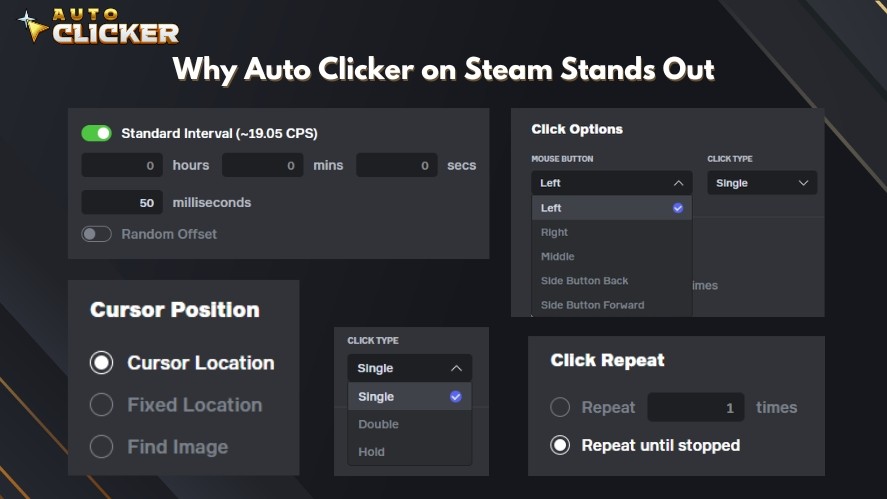
Together, these features create a foundation for stable and predictable automation. They allow for more advanced use cases where precision control and timing become critical.
Precision Control and Timing
Auto Clicker provides precise control over click timing, which is important in many testing software scenarios.
Testers can define exact millisecond intervals and click durations to validate timing-sensitive behaviors.
This is useful when testing double-click logic, UI responsiveness, or delay handling during software testing basics.
Background Functionality
The tool can operate while testers monitor the system. QA teams can review logs, capture screenshots, or record screen activity while the Auto Clicker on Steam continues running.
This supports longer test sessions and makes it easier to spot performance issues during UI tests.
Scenarios for QA Teams Using Auto Clicker For Software Testing
Auto clickers are especially useful when QA teams need fast feedback on how an interface behaves under pressure.
Below are common, practical scenarios where an auto clicker adds real value to software testing and types.
One common use case is testing the response time of a login button under rapid click pressure.
By triggering hundreds of clicks in a short time, testers can observe delays, duplicate requests, or UI freezes. This helps uncover poor request handling that may not appear during manual testing.
Another scenario is ensuring form elements remain stable after 500+ clicks.
Repeated submissions can reveal memory leaks, broken validations, or UI elements that slowly drift or break. This is useful for functionality testing software where reliability matters over long sessions.
QA teams also use auto clickers for stress-testing desktop UIs.
Continuous clicking can expose lag, rendering issues. It can also expose crash points in applications that rely on graphical interfaces.
Testing Desktop Apps with Auto Clicker
Auto clickers work well with Windows apps, Electron-based software, and legacy systems without modern test APIs.
Many older applications cannot be easily covered by automated software testing tools. In these cases, an auto clicker becomes a simple but effective solution.
Testers can simulate user behavior without modifying the application or writing scripts.
This approach is especially helpful for internal tools, admin panels, or standalone desktop software where traditional automation frameworks are hard to apply.
Complementing Other Testing Tools
Auto clickers are most powerful when used alongside other software functionality testing tools.
For example, testers can use Postman for API testing while a free auto clicker handles UI interactions. JMeter can measure backend performance while click automation stresses the frontend.
Selenium or Playwright can manage full test suites, while the auto clicker fills gaps for simple or repetitive actions.
This hybrid strategy improves coverage without adding unnecessary complexity to the testing stack.
Tips to Use Auto Clicker Safely in Testing Environments
Auto clickers should always be used in test or staging environments, never on live production systems.
Automated clicking can trigger unexpected results if used on real user data. So, keeping tests isolated protects both users and infrastructure.
During longer test runs, it’s important to monitor memory usage and overall app behavior.
Rapid or continuous clicking can expose leaks or performance drops. However, it can also stress the system running the test.
Watching CPU and RAM usage helps QA teams understand whether issues come from the app itself or the test setup.
Using screen recording tools is another smart practice.
Recordings allow testers to review test playback, verify UI behavior, and share visual evidence with developers. This is especially useful when bugs only appear after hundreds of automated clicks.
For better traceability, combine clicking auto clickers with logging tools.
Application logs, event logs, or simple timestamps help create an audit trail that explains what happened during each test run.
How Auto Clicker on Steam Stands Out
Auto Clicker on Steam stands out as a reliable tool for QA testers because it focuses on simplicity, safety, and usability.
Instead of trying to replace full automation frameworks, it delivers exactly what many testers need.
- One-click Installation via Steam: No manual downloads, no risky installers, and no setup friction.
- Steam-verified Security: Free from malware, adware, or hidden background processes.
- Lightweight Performance: Runs smoothly alongside test environments.
- Customizable Click Behavior: Supports adjustable intervals, repeat counts, and click positions.
- Active Community and Regular Updates: Improvements and fixes are driven by real user feedback.

These features make Auto Clicker on Steam a dependable companion for QA workflows.
Its balance of simplicity and control makes it useful for teams that need fast, repeatable UI testing. It works well when full automation frameworks would add too much overhead.
Frequently Asked Questions
An auto clicker automates repetitive UI actions like clicking buttons, submitting forms, and repeating test steps, making manual testing faster and more consistent.
Auto clickers are ideal for simple GUI testing, stress tests, and legacy desktop apps where tools like Selenium or Playwright would be unnecessary or difficult to set up.
Common use cases include GUI smoke tests, rapid interaction checks, login button stress tests, and repeated form submission testing.
Yes, automated clicking removes human inconsistency and ensures every test runs with the same timing and behavior, which improves reliability.
No, an auto clicker works best as a lightweight companion to tools like Selenium, Postman, or JMeter by handling repetitive click-based tasks.
Conclusion
Auto Clicker for software testing provides a simple and affordable way to handle basic UI automation.
It reduces manual effort and improves test consistency. It also helps QA teams spot issues caused by repeated user actions.
While it does not replace full automated software testing tools, it fills an important gap. It is well-suited for GUI testing, stress testing, and quick validation tasks.
For QA software testers and developers who need lightweight automation without scripting, Auto Clicker on Steam is a practical solution worth exploring.

What Is a Millisecond? Guide to Gaming, Automation & Speed

Fast Clicker Test: How Fast Can You Really Click

Best Auto Clicker Settings for Faster Game Progress
About The Author
