
Auto Clicker vs Other Clicking Tools: Best Automation Tool in 2026
Clicking tools help automate repeated mouse actions on a computer. Many games, office programs, and testing tools require users to click the same button many times. Over time, this can become slow and tiring.
To make things easier, many people use tools like an autoclicker, macro tools, or script automation software. These programs create automated mouse clicks so users do not need to click manually.
In this guide, we will look at different clicking tools and how they work. We will compare auto clicker software, macro tools, and scripting solutions. You will also learn when an auto click tool is the best choice for gaming, productivity, and other repetitive tasks.
What Are Clicking Tools

Clicking tools are programs designed to automate mouse clicking actions on a computer. Instead of manually pressing the mouse button again and again, these tools generate automated mouse clicks based on settings chosen by the user.
In simple terms, clicking tools act as virtual input systems that replicate mouse activity. They send commands to the operating system in the same way a physical mouse would. As a result, the computer treats those automated inputs as real clicks.
These tools fall into the category of mouse automation tools. Their main goal is to remove repetitive work from the user and allow software to handle the task instead.
Core Purpose of Clicking Tools
The primary purpose of clicking tools is to automate repetitive tasks that involve mouse interaction. These tasks might seem small at first, but they quickly become time consuming when repeated hundreds or thousands of times.
For example, a user playing an idle game might need to click repeatedly to earn in game currency. Similarly, someone working with spreadsheets or web forms might need to repeatedly confirm actions with a mouse click.
Rather than performing those clicks manually, a user can rely on auto click software to complete the process automatically.
Key Features Found in Clicking Tools
Most modern auto clicker software offers several features that make automation workflow flexible and easy to use. Common features include:
- Adjustable click intervals
- Custom click repetition settings
- Multiple mouse button options
- Click location targeting
- Hotkeys to start or stop automation
These features allow users to customize their automation depending on their needs. For instance, a gamer might prefer extremely fast clicks, while an office worker might only need clicks every few seconds.
Who Uses Clicking Tools
Many different types of users rely on automated clicking tools in their daily tasks.
Gamers are among the most common users. Many games include mechanics that require repeated clicks to progress. Instead of constantly clicking the mouse, players often use a mouse clicker to automate these actions.
Developers and testers also benefit from click automation tools. During software testing, it is often necessary to simulate repeated user input. Automated clicks help developers test interfaces and detect bugs more efficiently.
Office workers can also benefit from productivity automation software. Tasks such as data entry, form submission, and repetitive interface actions can be simplified with auto clicker software.
Finally, productivity enthusiasts often use automation tools to streamline digital workflows. By reducing repetitive computer tasks, users can focus on tasks that require actual attention and creativity.
For all these reasons, clicking tools have become an important category of productivity tools.
Why People Use Clicking Tools for Gaming and Work

The growing popularity of clicking tools comes from a simple reason. They save time and effort.
When repetitive clicking becomes part of a task, click automation software can dramatically improve efficiency. Instead of wasting time on mechanical actions, users can allow software to handle them automatically.
Below are several common reasons why people choose to install an automatic clicker.
Reducing Repetitive Tasks
Repetitive actions are one of the biggest sources of inefficiency in digital workflows. When the same mouse action must be repeated over and over, productivity drops quickly.
For example, many idle and incremental games rely heavily on repeated clicking. Players often need to click continuously to collect rewards or generate resources. In these situations, using an autoclicker allows the game to progress without constant manual input.
Similarly, repetitive clicking appears in many work related tasks. Data entry processes often require repeated confirmation clicks. Web based systems sometimes require users to press the same button repeatedly during workflows.
A simple auto clicker download can eliminate much of this repetitive effort. Once installed, the software handles the clicks automatically.
Software testers also use automation utilities to simulate user activity. Instead of manually clicking through an interface, they rely on automated mouse clicks to perform repetitive tests quickly.
Improving Efficiency and Productivity
Another major advantage of automated clicking tools is improved efficiency.
Manual clicking takes time. Even if each click only takes a second, the time adds up quickly when repeated hundreds or thousands of times.
By contrast, auto click software performs those clicks instantly and consistently.
This allows users to:
- Complete tasks faster
- Reduce manual effort
- Improve workflow speed
- Focus on higher value work
Gamers often look for the best auto clickers because these tools help automate grinding mechanics in games. Instead of spending hours repeatedly clicking, players can allow the software to perform the work.
Similarly, productivity focused users rely on mouse input automation software to streamline repetitive processes.
Preventing Fatigue and Physical Strain
Another important benefit of auto clicker software is reduced physical strain.
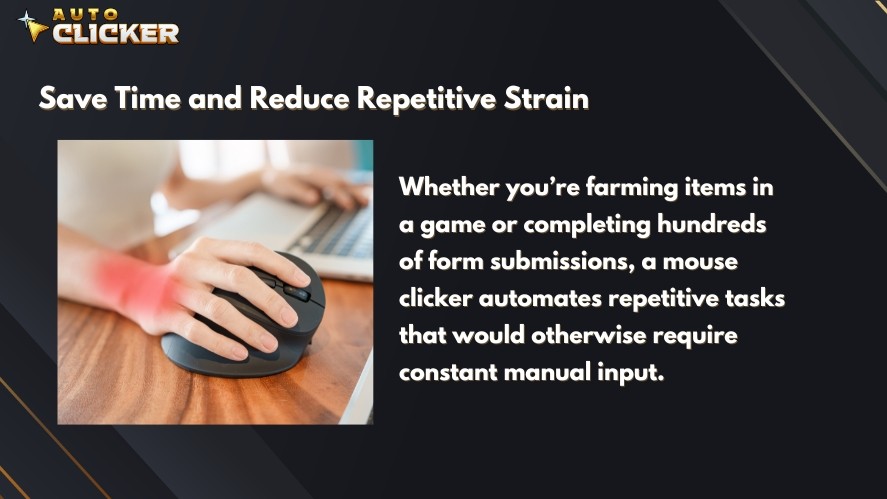
Continuous mouse clicking can lead to discomfort in the hands, fingers, and wrists. Over long periods of time, repetitive strain injuries may even develop.
This is especially common among gamers who spend long sessions performing repetitive actions.
Using an automatic clicker helps minimize this strain. Instead of clicking thousands of times manually, the user can simply activate the automation and allow the tool to generate automated mouse clicks.
As a result, users can work or play longer without unnecessary physical stress.
Types of Clicking Tools Available Today
Not all clicking tools work the same way. In fact, several different categories of desktop automation tools exist today.
Each type offers different levels of complexity, flexibility, and control.
Understanding these categories can help users choose the best tool for their needs.
Auto Clickers
Auto clickers are the most widely used type of clicking tools. Their purpose is simple. They automatically perform mouse clicks at intervals set by the user.
For example, a user may configure the tool to click every second or every few milliseconds.
Because of this simplicity, autoclicker programs are extremely easy to use. Many people simply search for a download auto clicker solution when they need quick gaming automation tools.
Auto clickers are commonly used for:
- Idle games
- Repetitive gameplay actions
- Simple automation workflows
- Repeated interface actions
One of the main advantages of auto clicker software is its accessibility. Most tools require only a few settings before they begin generating automated mouse clicks.
As a result, they are often considered among the best auto clicker software options for beginners.
Another advantage is performance. Because they focus on a single task, most auto clickers are lightweight and efficient.
However, while they are excellent for simple tasks, they may not be suitable for complex automation sequences.
Macro Tools
While auto clickers focus on repeating simple mouse actions, macro tools offer a more advanced type of automation.
Macro tools allow users to record a sequence of actions and replay them later. These actions can include mouse clicks, keyboard inputs, cursor movements, and time delays.
In other words, a macro tool does not just repeat a single click. Instead, it can replay an entire workflow.
For example, a macro click sequence might include:
- Moving the mouse to a button
- Clicking the button
- Typing text into a field
- Pressing the Enter key
- Waiting a few seconds
- Repeating the process
Because of this, macro tools are often used for tasks that involve multiple steps.
Common Uses for Macro Tools
Many users rely on macro tools for both gaming and productivity tasks.
In gaming, macros can perform complex combos or repeated action sequences. Players sometimes use them to trigger multiple abilities or actions with a single button.
In productivity environments, macros can automate workflows that involve both mouse and keyboard input.
Examples include:
- Repeating data entry steps
- Navigating software menus
- Performing routine system tasks
- Automating testing workflows
Because macros can record multiple inputs, they are much more flexible than a simple mouse clicker.
Advantages of Macro Tools
Macro tools provide several powerful features:
- Ability to record complex workflows
- Support for both keyboard and mouse input
- High customization options
- Flexible automation behavior
For users who need more than basic auto click functionality, macros can be very useful.
Limitations of Macro Tools
However, macro systems also have drawbacks.
First, they require more setup compared to simple auto click software. Users often need to spend time recording actions and adjusting timing.
Second, macros may become unreliable if the interface of a program changes. For example, if a button moves to a different location, the macro sequence may fail.
Because of these challenges, many casual users still prefer basic auto clicker software for simple tasks.
Examples of Macro Tools
Several popular tools support macro automation. These include:
- AutoHotkey
- Gaming mouse macro software
- Keyboard macro utilities
Many gaming devices also include built in macro features.
However, if a user only needs repeated automated mouse clicks, installing a full macro system may be unnecessary.
Script Based Automation Tools
Another category of clicking tools involves script automation.
Script automation tools allow users to create programs that automate tasks using code. Instead of recording clicks or setting simple intervals, users write scripts that control mouse and keyboard behavior.
Because of this, script automation is extremely powerful.
How Script Automation Works
A script is a collection of commands written in a programming language. These commands guide the computer on what tasks to execute.
For example, a script may include commands such as:
- Move the mouse to a specific coordinate
- Perform a click
- Wait for a certain amount of time
- Repeat the action if a condition is met
Using this approach, developers can automate very complex tasks.
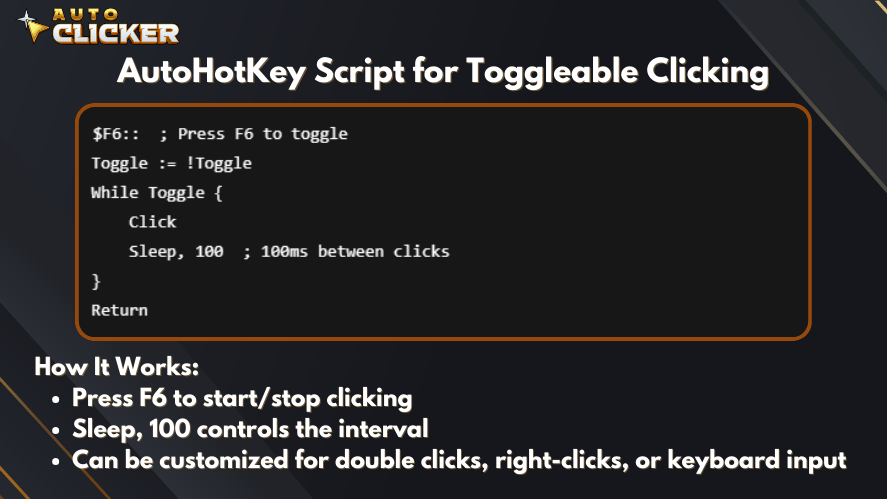
Many automation scripts also include logic such as loops, conditions, and error handling.
Common Uses for Script Automation
Script based automation is often used in technical environments.
Common use cases include:
- Software testing
- Development workflows
- Automation pipelines
- Data processing systems
Developers often rely on programming languages like Python to automate repetitive actions across multiple applications.
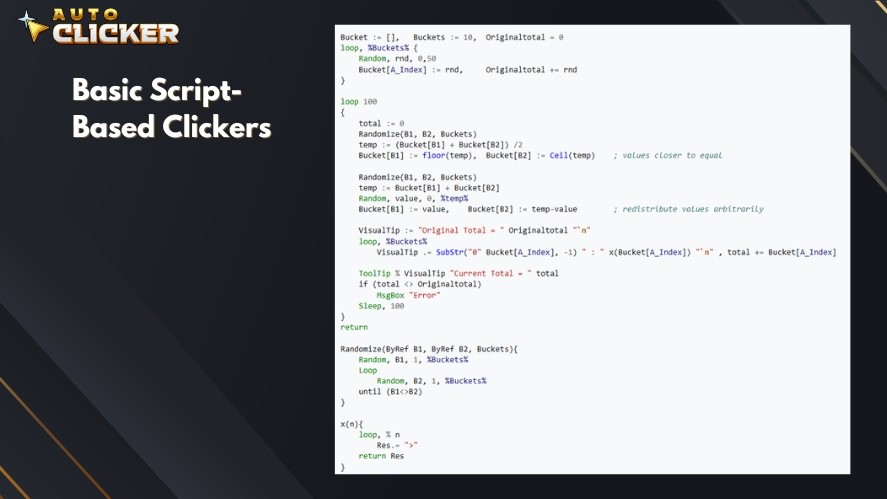
In addition, tools like AutoHotkey allow users to write scripts that control mouse and keyboard input.
Advantages of Script Automation
Script automation offers several powerful benefits.
First, it provides extremely high flexibility. Users can automate almost any type of task.
Second, scripts can include complex logic that adapts to different situations.
Third, scripts can automate entire workflows rather than just individual actions.
For advanced users, script automation can be far more powerful than traditional clicking tools.
Limitations of Script Automation
Despite its power, script automation is not ideal for everyone.
The biggest limitation is complexity. Writing automation scripts requires programming knowledge.
Many beginners find scripting difficult to learn. In addition, troubleshooting script errors can be time consuming.
For this reason, most casual users prefer simpler tools such as an autoclicker or basic macro software.
Built In Mouse Utilities
Some users rely on automation features built directly into their mouse hardware.
Many gaming mouse manufacturers include software that allows users to configure mouse behavior.
These utilities sometimes include basic clicking automation features.
Features Found in Mouse Utilities
Gaming mouse software may include:
- Rapid click buttons
- Basic macros
- Custom profiles
- Button remapping
- Input automation
These features allow gamers to customize how their mouse behaves in different games.
Advantages of Built In Mouse Utilities
Hardware based utilities have a few advantages.
First, they are tightly integrated with the mouse hardware. This means input actions are usually very fast and responsive.
Second, users do not need to install additional automation software.
Finally, gaming mice often allow users to store profiles directly on the device.
Limitations of Mouse Utilities
Despite these benefits, built in utilities also have limitations.
They often provide only basic automation features. In many cases, the software does not support advanced automation behavior.
For example, a gaming mouse may support simple macros but not complex automated clicking tools.
Because of this, many users still prefer dedicated auto clicker software when they need reliable automation.
Auto Clicker vs Other Clicking Tools
Now that we have explored the main categories, it becomes easier to compare them.
Different clicking tools serve different purposes depending on the user’s needs.
The table below compares the most widely used options.
| Tool Type | Ease of Use | Power | Best For |
|---|---|---|---|
| Auto Clickers | Very easy | Moderate | Idle games and repetitive tasks |
| Macro Tools | Medium | High | Gaming combos and workflows |
| Script Automation Tools | Hard | Very high | Developers and advanced automation |
| Mouse Utilities | Easy | Low | Basic gaming macros |
From this comparison, one thing becomes clear.
Auto clickers provide a strong balance between ease of use and useful features.
They provide enough automation power for most tasks while remaining easy to configure.
This is why many users search for the best auto clickers when they need simple automation.
Why Auto Clicker on Steam Stands Out
Many different autoclicker tools exist online. However, not all of them offer the same level of reliability.
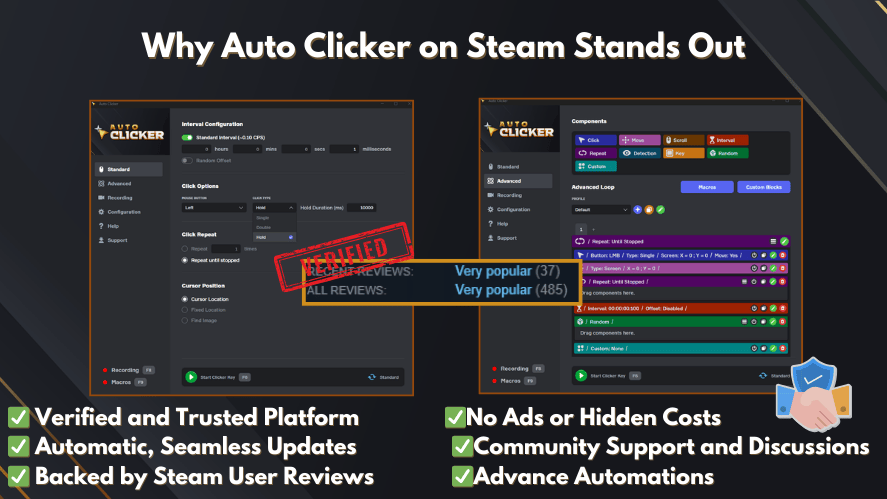
Some websites provide outdated or unsafe downloads. This creates risks for users who simply search for an auto clicker download.
Because of this, distribution platforms like Steam have become an appealing alternative.
Easy Setup
One of the main advantages of Auto Clicker on Steam is its ease of use.
The software is designed with a simple interface that allows users to configure settings quickly.
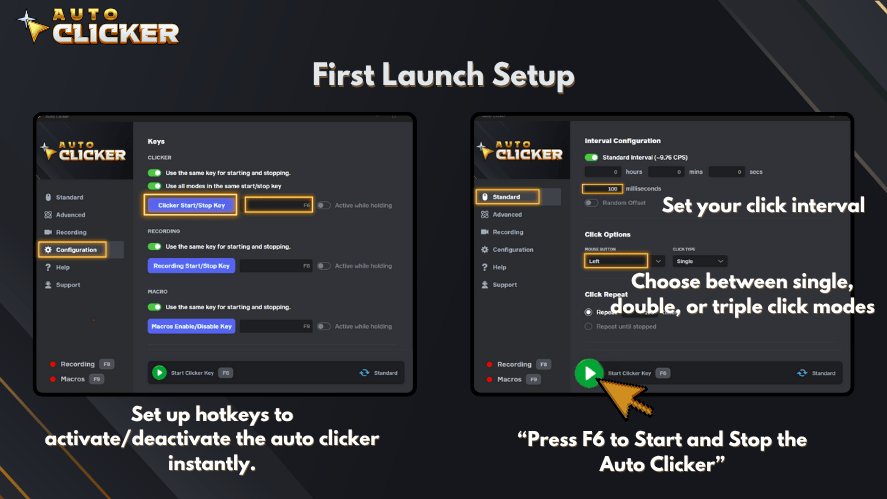
Users can set up automated clicking within seconds by adjusting a few options.
For beginners who are learning how to use auto clicker software, this simplicity is very helpful.
Flexible Click Automation
Despite its simple interface, the software still provides flexible automation features.
Users can customize several aspects of the clicking process, including:
- Click intervals
- Number of repetitions
- Mouse button selection
- Click location
This flexibility allows the tool to support both gaming and productivity tasks.
Useful for Gaming and Productivity

Auto click tools are often associated with gaming, but they also have many productivity uses.
Gamers commonly use autoclick features for:
- Idle games
- Resource farming
- Repetitive gameplay loops
Meanwhile, productivity users may rely on automated clicking tools for tasks such as:
- Repetitive office workflows
- Software testing
- Interface automation
Because of this wide range of applications, auto clicker software is useful for many types of users.
Reliable Distribution Through Steam
Another advantage is the platform itself.
Steam provides a secure and reliable distribution system. Users can safely download auto clicker tools without worrying about unsafe files.
In addition, the platform offers automatic updates and community feedback.
This helps ensure the software remains stable and reliable over time.
How to Choose the Right Clicking Tool
Selecting the right automation tool depends on a few key considerations.

Each user has different needs, and not every tool is suitable for every situation.
Below are some important factors to consider.
Consider Your Technical Skill Level
Your level of technical experience should influence your choice.
Beginners usually prefer auto clicker software because it requires minimal setup.
Intermediate users may prefer macro tools since they allow more complex automation.
Advanced users and developers often rely on script automation systems.
Identify the Type of Task
The complexity of your task also matters.
If you only need repeated clicks, a simple automatic clicker will work perfectly.
However, if your task involves multiple steps, a macro system may be more suitable.
For highly advanced workflows, scripting may be the best option.
Consider Gaming or Productivity Needs
Gaming tasks often involve repetitive clicking actions. In these cases, many players rely on the best auto clicker software available.
Productivity tasks may vary. Some workflows require only basic clicking automation, while others involve multiple steps.
By understanding your needs, you can choose the most effective automation tool.
Frequently Asked Questions About Clicking Tools
An autoclicker is a type of auto clicker software that automatically performs mouse clicks at a specified interval. Users commonly use autoclicker tools for idle games, repetitive tasks, and automation workflows.
Auto clickers are generally safe when downloaded from trusted sources. Platforms like Steam provide reliable distribution and updates, which reduces the risk of downloading unsafe software.
The best auto clicker software depends on your needs. Simple autoclick tools are best for repeated clicks, while macro tools or script automation systems are better for complex workflows.
Yes. Clicking tools help automate repetitive mouse actions, allowing users to save time and reduce manual effort. Many developers, gamers, and office workers use automated clicking tools to improve efficiency.
Users can download auto clicker software from trusted platforms or developer websites. Using verified platforms helps ensure that the software is safe and regularly updated.
Final Thoughts on Clicking Tools
Clicking tools have become an important part of modern digital workflows. They help users automate repetitive tasks that would otherwise consume time and energy.
Different tools offer different capabilities. Auto clickers provide simple and reliable automated mouse clicks. Meanwhile, macro tools allow more complex action sequences, and script automation systems enable powerful workflow automation for developers.
However, for most users, simplicity matters. This is why auto clicker software remains one of the most popular automation solutions today. It is easy to use, lightweight, and highly effective for repetitive tasks.
For gamers, productivity users, and anyone who wants to reduce repetitive work, Auto Clicker on Steam provides a convenient and efficient solution. It offers stronger control, smoother performance, customizable settings, and a more complete clicking experience for everyday automation.
If you only want to test basic clicking first, you can also visit AutoClicker.com and try the free limited version before moving to the full experience.

Auto Clicker App Reviews: Top Tools Gamers Shouldn’t Miss

Top 5 Signs an Auto Clicker Might Be Malware

Are Auto Clickers Allowed in Games?
About The Author
