
Can Auto Clicker Be Detected by Games and Apps
Can auto clicker be detected? This is one of the most common questions people ask before using an auto click tool. Whether you are playing clicker games, testing your click speed, or trying to automate mouse clicks for work, the concern is real.
So, why do people use auto clickers in the first place?
In simple terms, an auto clicker is a tool that performs mouse clicks for you. Instead of clicking again and again, the software does it automatically. This is helpful in clicking games where progress depends on how fast you click. It is also useful in tasks that require repeated actions.
At the same time, many users wonder if it is safe to use auto clicker tools. Some worry about bans. Others worry about detection. Because of this, it is important to understand how these tools work and how systems detect them.
Before we go deeper, let’s first understand what an auto clicker really is.
What Is an Auto Clicker

An auto clicker, also called a mouse clicker or automatic clicker, is software that simulates mouse clicks. It can click at a set speed, location, and pattern.
Common Uses of Auto Clickers
Auto clickers are used in many ways. For example:
- In clicker games where constant clicking is needed
- In testing tools like click speed test platforms
- In office tasks to automate mouse clicks
- In accessibility support for users who cannot click repeatedly
Because of this, auto click has become very popular. Many people even search for auto clicker download options or guides on how to download an auto clicker.
How Auto Clickers Work
Most tools work by sending repeated click signals to your system. However, better tools go further.
They can:
- Adjust click speed
- Add delays between clicks
- Randomize timing
- Target specific screen areas
This is important because natural human clicking is not perfect. A real person does not click at the exact same speed every time.
As a result, advanced tools try to copy human behavior. This helps improve auto clicker safety and reduces the chance of detection.
Can Auto Clicker Be Detected by Apps or Games

Now let’s answer the main question clearly.
Yes, can auto clicker be detected? The answer is yes, but it depends on several factors.
Some apps do not care at all. Others actively look for automation.
What Affects Detection
There are three main things that affect whether an auto clicker tool detected situation happens.
First, the type of app matters. Simple apps often do not check for automation. On the other hand, competitive games are strict.
Second, anti cheat systems play a big role. Many games use tools to detect unusual behavior.
Third, your behavior matters more than the tool. Even the best auto clicker software can be detected if used poorly.
So, it is not just about the software. It is about how you use it.
Detection Based on Behavior Patterns
Most modern systems do not just scan for software. Instead, they study behavior.
This means your clicking pattern is very important.
Common Red Flags
Here are some signs that can trigger detection:
- Extremely fast click speeds
- Perfect timing between each click
- No variation at all
- Long periods of nonstop clicking
For example, if you run a click speed test and maintain a perfect pattern for minutes, that is not human behavior.
Real users make small mistakes. They slow down. Pause and change rhythm.
Because of this, systems can detect automated mouse click patterns even if they do not detect the tool itself.
Detection Through Anti Cheat Systems
In games, detection is more advanced.

Many popular games use anti cheat systems such as:
These systems monitor how players behave.
How They Detect Auto Clickers
They look for:
- Unusual click speed
- Repeated patterns
- Impossible actions
There are two main types of detection.
Client side detection scans your device. It looks for known programs like a mouse clicker.
Server side detection looks at your behavior. It checks how you play over time.
Server side detection is harder to avoid. This is because it does not care what tool you use. It only cares about what you do.
Detection via Software Scanning
Some apps try to detect auto clickers directly.
They may scan for:
- Running processes
- Known auto clicker signatures
- Background activity
However, this method has limits.
Many apps cannot scan deeply due to privacy rules. Also, new tools can avoid simple scans.
Because of this, not every auto clicker tool detected case comes from scanning. In fact, behavior tracking is often more effective.
What Happens If an Auto Clicker Is Detected
Now let’s talk about the risks.
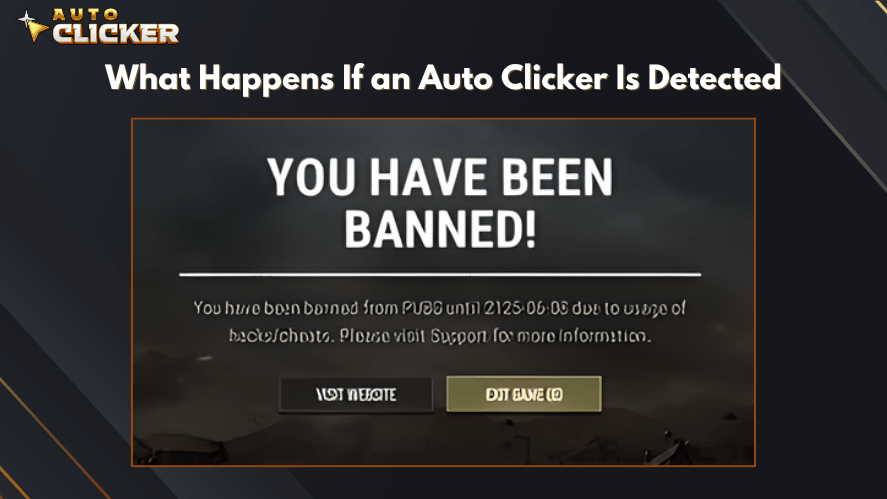
Many users ask, can auto clicker get you banned? The answer depends on where you use it.
In Games
In online games, the risk is higher.
Possible outcomes include:
- Temporary bans
- Permanent account suspension
- Loss of progress
- Removal from leaderboards
This is especially true in competitive games.
In Productivity Apps
In work or productivity tools, the situation is different.
You may see:
- Warning messages
- Limited features
- Account flags
However, serious penalties are rare unless rules are clearly broken.
In Offline or Single Player Use
In offline use, there is usually no risk.
There are no systems watching your behavior. So, auto clicker safety is not a major concern here.
This makes auto clickers ideal for personal use or offline clicking games.
Are All Auto Clickers Detectable
Not all auto clickers are the same. Some tools are simple, while others come with more advanced features. Because of this, detection is not always guaranteed.
Key Differences Between Tools
First, simple tools often use fixed timing. This means every click happens at the exact same interval. As a result, they are easier to detect.
On the other hand, advanced tools include features like:
- Random timing intervals
- Adjustable click speed
- Custom click patterns
- Targeted clicking areas
These features help create more natural behavior. As a result, the clicking behavior appears more natural rather than perfectly timed.
Behavior Matters More Than the Tool
Even though tools matter, your behavior matters more.
For example, if you use an advanced automatic clicker but set it to an extremely fast click speed with no variation, it can still be flagged.
In contrast, a well-configured tool with realistic settings can reduce risk.
This is where auto clicker anti detection settings come into play. They do not make the tool invisible, but they help avoid obvious patterns.
Auto Clicker on Steam vs Other Click Automation Tools
Not all auto click tools are the same. Some offer basic features, while others provide better control and safety. The table below shows the key differences between Auto Clicker on Steam and other tools.
| Feature | Auto Clicker on Steam | Other Click Automation Tools |
|---|---|---|
| Ease of Use | Simple setup with user-friendly interface | Can be basic or confusing depending on the tool |
| Installation | Installed directly via Steam platform | Often requires manual auto clicker download |
| Safety & Trust | Distributed through a trusted platform (Steam) | May come from unknown or unverified sources |
| Customization | Advanced settings like random intervals and click patterns | Limited options in many free tools |
| Auto Clicker Safety | Designed with flexible settings for safer use | May lack features for natural behavior |
| Updates | Regular updates through Steam | Updates may be rare or unavailable |
| Performance | Stable and optimized | Performance varies widely |
| Detection Risk Control | Supports human-like click adjustments | Often uses fixed patterns, easier to detect |
| Support & Community | Active Steam community and support | Limited or no support |
| Use Cases | Suitable for gaming and productivity tasks | Often focused on basic automation only |
There are many tools available today. However, not all offer the same experience.
Ease of Use
Many tools found through auto clicker download searches are basic. Some are hard to set up or come with limited features.
In comparison, Auto Clicker on Steam is designed to be user friendly. You can set it up quickly and start using it right away.
Customization Features
Customization is important if you want to automate mouse clicks safely.
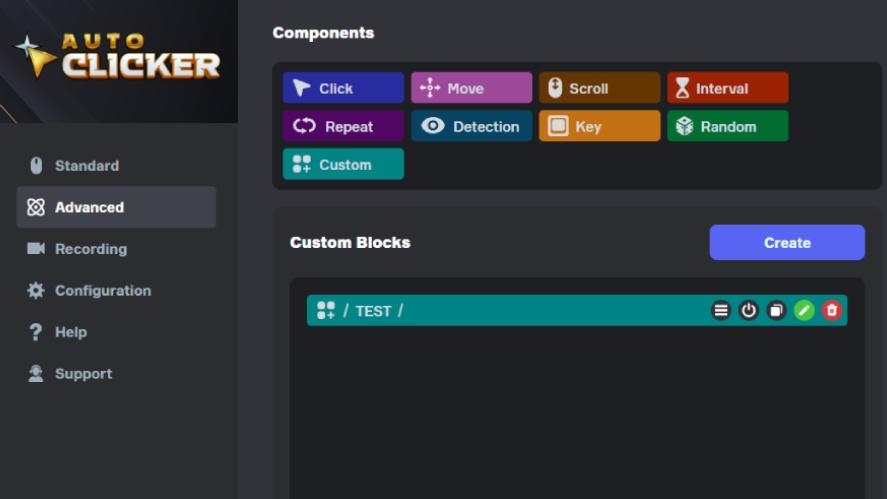
Auto Clicker on Steam offers:
- Flexible timing controls
- Random delay options
- Adjustable click locations
Because of this, users can create more natural patterns.
Platform Benefits
Using a Steam-based tool also has advantages:
- Regular updates
- Better security
- Active community support
This makes it a strong option for users looking for the best auto clicker software.
How to Use Auto Clickers Responsibly
Using an auto clicker is not just about installing the tool. It is also about using it the right way.
This raises an important question: are auto clicker tools safe to use? Yes, but only if you follow good practices.
Best Practices for Safe Use
Here are some simple guidelines:
- Always check the rules of the app or game
- Avoid using auto clickers in competitive environments
- Use them in offline or idle games when possible
- Adjust settings to avoid perfect patterns
- Do not use extremely fast click speeds for long periods
In addition, if you are using automation in a work setting, be transparent. This helps avoid misunderstandings.
Common Myths About Auto Clicker Detection
There are many myths about auto clickers. Let’s clear up a few of the most common ones.
Myth 1: All Auto Clickers Are Instantly Detected
This is not true.
Some apps do not detect auto clickers at all. Others only flag unusual behavior. So, detection depends on context.
Myth 2: Only the Software Matters
Many people think using a different tool will keep them safe.
However, behavior is more important than the tool. Even a simple mouse clicker can go unnoticed if used carefully.
Myth 3: You Will Always Get Banned
This is also false.
While it is true that can auto clicker get you banned is a real concern, bans only happen in certain situations. Usually, this involves breaking clear rules in competitive platforms.
Important Disclaimer When Using Auto Clickers
Before using any automation tool, it is important to understand the risks.
Use at Your Own Risk
You are responsible for how you use any auto click tool.
If you use it in restricted environments, you may face penalties. So, always be careful and informed.
No Guarantee Against Detection
No tool can promise full protection.
Detection systems are always improving. Because of this, even well-configured tools can be flagged in some cases.
No Liability for Consequences
Auto Clicker on Steam is intended for general automation and productivity purposes. Users are solely responsible for how they use the software. We do not guarantee that the tool will be undetectable in all environments, and we are not liable for any account actions, restrictions, or bans that may occur as a result of its use. Always review and comply with the terms of service of any platform where you use automation tools.
Frequently Asked Questions
Yes, games can detect auto clickers, especially in competitive modes. Most systems track behavior like fast click speed and repeated patterns rather than just the software itself.
Yes, using an auto clicker in games that do not allow automation can lead to bans. This may include temporary suspensions or permanent account removal depending on the rules.
It can be safe to use auto clicker tools in offline games or allowed environments. However, using them in restricted platforms increases the risk of detection and penalties.
Apps detect auto clickers by analyzing click patterns, timing, and behavior. Some also scan for known software, but behavior tracking is more common.
The best auto clicker software usually includes customizable settings like random delays and adjustable click speed. These features help create more natural behavior.
Final Thoughts Can Auto Clicker Be Detected
So, can auto clicker be detected?
Yes, it can. However, it is not always detected. The outcome depends on where and how you use it.
If you use an auto clicker in a strict online game with high click speed and perfect timing, detection is likely.
On the other hand, if you use it in offline tasks or allowed environments with natural settings, the risk is much lower.
In the end, smart usage is key.
Choose tools with flexible settings. Avoid extreme patterns. Follow the rules of the platform you are using.
Auto clickers can be very useful. They can save time, reduce effort, and improve efficiency. However, responsible use is what keeps them safe.

Free Auto Clicker: Top 5 Tools You Can Use Right Now

How to Use Color Detection in Auto Clicker on Steam

How to Automate Repetitive Tasks on Your Computer
About The Author
