
Where to Download Trusted Auto Clicker Apps Safely
If you’re searching for a trusted auto clicker, you’re likely looking to automate repetitive clicking tasks without risking your system’s safety. Whether you’re a gamer trying to grind more efficiently, a developer testing UI elements, or someone filling out endless forms, auto clickers can be a powerful productivity booster.
But here’s the issue: not all auto clicker apps are safe. In fact, downloading from the wrong source could lead to malware, spyware, or even ransomware attacks on your device. You might also unknowingly give access to sensitive data or allow background processes to slow your system down.
So, how do you download auto clickers safely without compromising your security? That’s what this guide is here for. We’ll break down the risks, identify what makes a safe option, and give you trusted places where you can confidently get an auto clicker download.
Understanding the Risks of Untrusted Auto Clickers

Before diving into recommendations, it’s important to understand the dangers of downloading auto clickers from unreliable sources. Many users assume all clickers are the same, but that couldn’t be further from the truth.
Malware and Security Threats
One of the most serious risks of using an unverified auto clicker is malware. These programs can hide malicious code inside the installation file. Once installed, it might:
- Install ransomware
- Steal login credentials
- Hijack your browser settings
- Log your keystrokes
This is why using a safe auto clicker is non-negotiable. You should never trust random files shared in forums, Discord groups, or shady websites with excessive ads and pop-ups.
Privacy Concerns
Besides viruses, untrusted auto clickers can also pose privacy threats. Some of them secretly collect your personal data or monitor your activity without your knowledge. If you’re using your computer for banking, shopping, or work, this could expose highly sensitive information.
Using a free and safe auto clicker from a known source will help you avoid these risks. Especially when the software is open about its purpose and doesn’t ask for unnecessary permissions.
System Instability
Another issue with poorly made auto clickers is how they affect your system. These tools might:
- Use too much memory or CPU
- Cause app crashes or freezes
- Run background processes that never turn off
- Conflict with your antivirus
All these can lead to performance drops or unexpected restarts. Therefore, always stick with the safest auto clicker apps that are optimized, clean-coded, and tested by the community.
What Makes an Auto Clicker “Trusted”?
Not every auto clicker is created equally. Some are built by professional developers, regularly updated, and tested by thousands of users. Others are built for one-time use, never updated again, and packed with hidden threats. So, what separates a trusted auto clicker from a risky one?
Verified Developer
One key sign is a verified or well-known developer. When you download from a platform like Steam or the Microsoft Store, the developer usually has to go through verification steps. This adds a layer of safety.
For example, Auto Clicker Steam listings are reviewed before being published. This drastically reduces the chance of getting malicious code.
User Reviews and Ratings
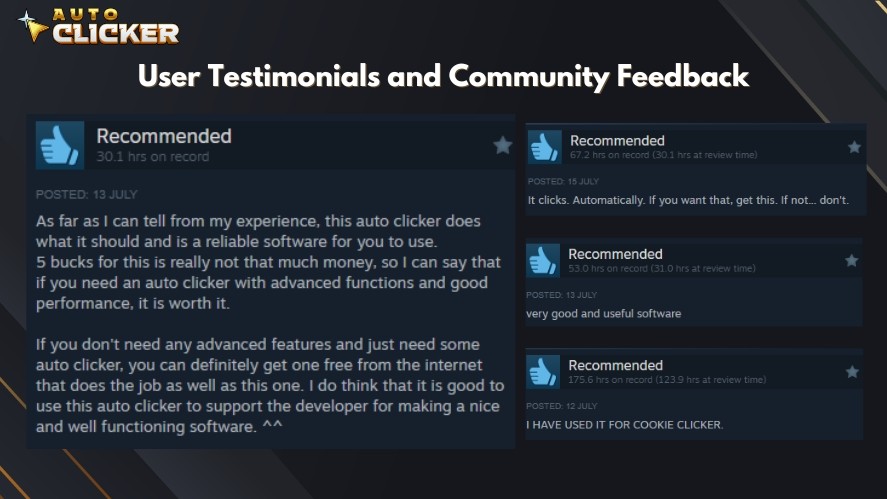
Another good way to check if an auto clicker is safe is by looking at the reviews. Platforms like Steam or Reddit have active communities that share honest feedback. If an app has hundreds or thousands of reviews with detailed comments, it’s more likely to be legit.
Avoid apps with no reviews or suspiciously glowing comments. These are often paid or fake.
Regular Updates
Frequent updates signal that the software is being actively maintained. Developers who care about security will patch bugs and address vulnerabilities. If the auto clicker download hasn’t been updated in years, it might not work well on modern systems and may have security issues.
Choose tools where the developer engages with the user base, posts changelogs, and provides update logs.
Open Codebase or Transparency
Some of the best auto clicker tools are open-source. This means the code is visible to the public, allowing anyone to inspect it. Tools like this offer a level of transparency that makes them trustworthy — especially when hosted on GitHub.
That said, you should be careful. Just because something is open-source doesn’t mean it’s safe to run without checking. Look for active repositories with many stars and recent updates.
Where to Download a Trusted Auto Clicker Safely
Let’s now look at the best and safest places to download an auto clicker. These sources are popular in the community, trusted by thousands, and free from common threats.
1. Auto Clicker on Steam – The Safest Choice
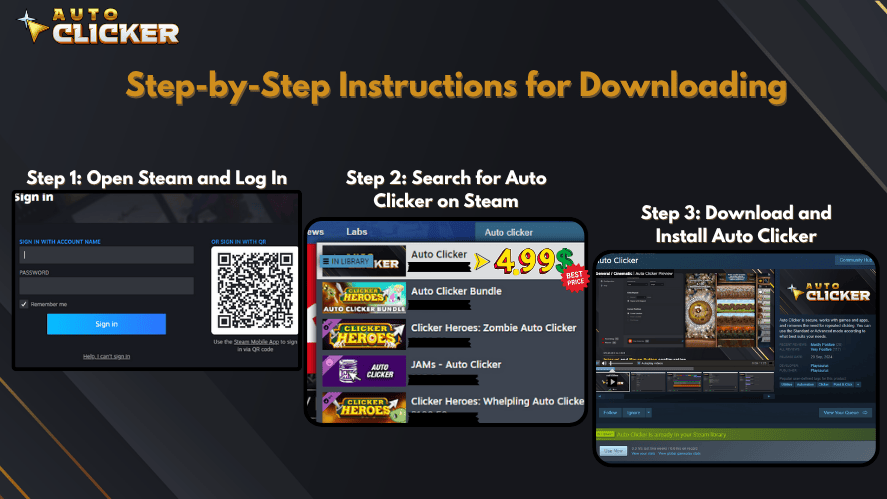
If you’re serious about getting a trusted auto clicker, your first stop should be Steam. Here’s why:
- Steam is a secure platform run by Valve.
- All software must pass security reviews.
- Steam apps are easy to install, update, or remove.
When using Auto Clicker Steam, you also benefit from user reviews, developer transparency, and community support. It often includes:
- Cloud backup for settings
- Custom hotkeys
- Simple user interface
- Regular bug fixes
✅ Why choose this? Using an auto clicker from Steam ensures you’re getting a clean, working, and auto clicker download safe product. You can trust the installation process, updates, and even uninstalling without leaving behind system junk.
2. Official Developer Websites
Another great place to find a safe auto clicker is from the developer’s own website. But this method requires extra care. Always check the following:
- The website uses HTTPS (not HTTP)
- There are no auto-downloading files
- There are no excessive pop-ups or ads
- You can find real contact information or an About page
Before installing, do a quick search in forums like Reddit or StackOverflow. Users will often post if the site or tool has ever had issues.
3. Microsoft Store (for Windows Users)
If you’re a Windows user, you can also find auto clickers in the Microsoft Store. While the selection is limited, this is still a secure source. Here’s why:
- Microsoft screens and reviews software.
- You don’t need to worry about EXE files.
- Auto updates are enabled by default.
However, some tools may be outdated or have fewer features. Still, it’s a solid place to get a mouse clicker app that’s low-risk.
Look for listings with reviews and verify that it works with your Windows version.
4. GitHub and Open Source Platforms
If you’re comfortable reading code or want full control, GitHub is an ideal platform to get an automatic clicker. Here, developers share source code that you can compile yourself or download as a pre-built binary.
Make sure to:
- Look at how recently the project was updated.
- Check for community engagement (stars, forks, issues).
- Read the README and verify the download instructions.
- Scan files before launching.
Popular projects often have many users, which adds another layer of safety. These tools usually focus on performance and avoid bloated features.
5. Avoid These Risky Sources
Just as there are safe platforms, there are also risky ones you should steer clear of. No matter how tempting the download seems, skip these places:
- Freeware download sites full of ads
- YouTube video descriptions with sketchy links
- Random Discord DMs or forums with no verification
- Cracked or modded versions of auto clickers
Many of these tools may work, but they also carry risks of automated mouse click tracking or hidden malware. It’s not worth it just to avoid paying a couple of dollars.
Auto Clicker on Steam: A Standout Trusted Auto Clicker
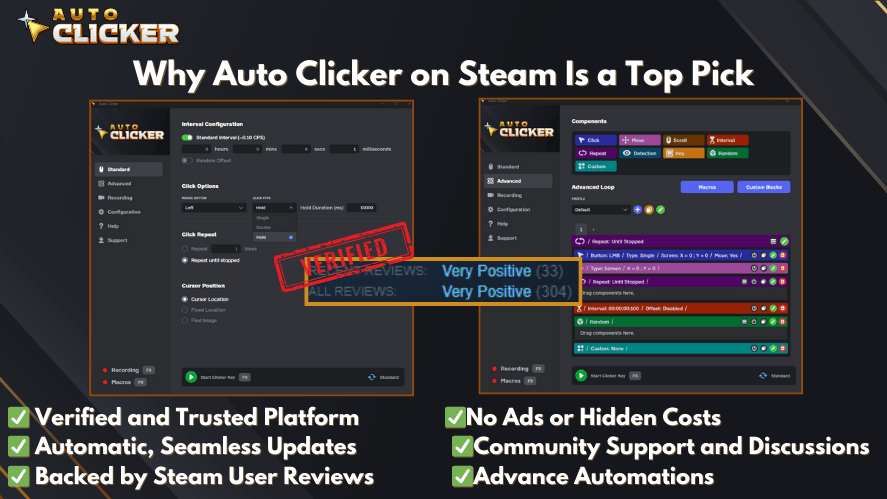
Now let’s focus more closely on Auto Clicker on Steam — one of the safest and most recommended tools available today.
Key Features That Users Love
Here are some things that make it stand out:
- Adjustable click intervals and delays
- Custom hotkeys for start/stop
- Left, right, or middle button support
- Lightweight with no extra installations
- User-friendly layout for beginners
Whether you’re looking for the best auto clicker for Windows or just something simple that works, this one delivers.
Security Benefits
Security is a big reason why so many trust this version. Here’s what helps:
- All updates come from Steam servers
- No background installations or toolbars
- User feedback keeps developers accountable
- Easy uninstall that removes all traces
So, when someone asks, “Is Auto Clicker on Steam safe?”, the answer is yes — if you’re downloading the correct listing from a verified developer.
How to Identify a Safe Auto Clicker Before Downloading
Even when you know where to look, you still need a system to check if an app is truly safe. This step matters because some harmful files slip through lesser-known platforms. Therefore, taking a few minutes to verify a file can protect your system for years.
1. Scan the File with Antivirus Tools
Before opening any EXE file, upload it to a service like VirusTotal. This tool scans the file using dozens of antivirus engines. As a result, you can see if any threats are detected.
This step is especially useful when you:
- Download from a developer website
- Get a tool from GitHub
- Try a new version of a clicker
If several engines flag the file, do not install it. Instead, look for another auto clicker download safe alternative.
2. Read User Reviews Carefully
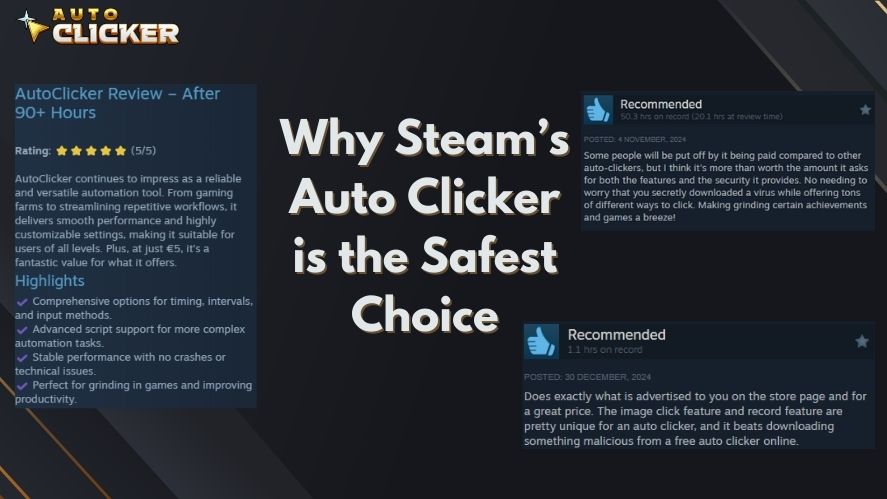
Reviews are one of the best ways to judge if an auto clicker is safe. However, do not just look at star ratings. Read the comments. Look for phrases like:
- “Clean install”
- “No bloatware”
- “Been using for months”
- “No ads or pop-ups”
Also, search the app name on Reddit or Google. Often, users will post warnings if something shady is happening.
3. Verify the Developer’s Website and Identity
A trustworthy developer is open about who they are. Therefore, check for:
- An About page
- A support email
- A privacy policy
- Clear branding
If a site has no contact info and only exists to push a download button, that is a red flag. A trusted auto clicker always comes from a transparent source.
Common Features of a Trusted Auto Clicker
A good auto clicker does more than click fast. It also respects your system and your privacy. Most high-quality tools share these traits:
- No ads or forced installs
- Runs without admin access
- Lightweight, often under 5MB
- Clean uninstall with no leftovers
- Simple controls for speed and timing
- Hotkeys for quick control
These features show that the tool was built with care. They also help you automate mouse clicks without slowing your computer.
The best auto clicker software focuses on performance and safety, not gimmicks.
How to Download an Auto Clicker Safely (Step-by-Step)
Many users search for phrases like how to download an auto clicker, how to download a auto clicker, or how to download auto clicker. The steps are simple when you use trusted sources.
Here is a safe process you can follow every time:
- Choose a trusted platform such as Steam, Microsoft Store, or a verified developer site.
- Check reviews and ratings.
- Download the file from the official page only.
- Scan the file using antivirus or VirusTotal.
- Install and test in a low-risk environment first.
By following this method, you reduce your risk to near zero. You can also find a download free auto clicker option on Steam or GitHub without sacrificing safety.
This approach works whether you need an auto clicker for Windows, a lightweight mouse clicker, or a full-featured automatic clicker for long tasks.
Real-World Use Cases for Auto Clickers

Auto clickers are not just for games. In fact, many professionals use them daily.
Gaming
Players use auto clickers in:
- Idle games like Cookie Clicker
- Grinding tasks in MMOs
- Repetitive farming actions
Always check game rules first. Some multiplayer games ban automation.
Productivity and Work
Office workers and developers often use auto clickers to:
- Test software buttons
- Fill repetitive forms
- Run stress tests on UI elements
- Simulate user behavior
This is where tools that automate mouse clicks save hours of manual work.
Accessibility
For users with mobility challenges, a safe auto clicker can provide easier control over interfaces. It allows people to interact with systems that would otherwise be hard to use.
Frequently Asked Questions
A: Many versions are free or very low-cost. Always check the store listing for details.
A: It depends on the game. Single-player and idle games are usually fine. Competitive multiplayer games often forbid automation.
A: Auto Clicker on Steam is one of the safest and easiest tools to start with.
A: Yes. Many users rely on clickers for testing and data entry.
A: In most regions, yes. However, using them against a service’s rules can break terms of use.
Conclusion: Choose Safety — Use Trusted Auto Clickers from Verified Sources
Downloading the wrong tool can harm your system, steal your data, or slow your workflow. Therefore, safety must always come first.
The best path is simple:
- Avoid shady download sites
- Skip random links from comments and forums
- Choose platforms like Steam, Microsoft Store, or verified developers
Among all options, Auto Clicker Steam stands out as one of the safest choices. It offers a clean install, regular updates, and strong community support.
Whether you are gaming, testing software, or boosting productivity, always choose a trusted auto clicker from a verified source. Download smart, stay safe, and automate wisely.

Mouse Clicker: What It Is, How It Works, and Why You Might Need One

Script for Auto Clicking: How to Automate Clicks Like a Pro

Stop Auto Clicker Automatically with These Easy Methods
About The Author
