
Auto Mouse Clicker: Automate Clicks & Key Presses
Are you tired of repeating the same mouse clicks or key presses while gaming, testing software, or handling daily computer tasks? An auto mouse clicker can help automate these actions so you can save time, reduce strain, and complete repetitive tasks more easily.
In 2026, auto clickers are used for more than simple clicking. For example, gamers use them for idle games, testers use them for repeated UI actions, and some users rely on them for accessibility support. As a result, an auto mouse clicker can be useful for both casual and practical workflows.
Auto clickers work by mimicking human clicks and keystrokes, thereby eliminating the need for manual input. As a result, they are commonly used for:
- ✅ Gaming – Whether you’re automating clicks for RPGs, idle games, or competitive play, an auto mouse clicker can enhance your experience effortlessly.
- ✅ Productivity – In addition to gaming, this tool is perfect for speeding up tasks like form filling, web browsing, and data entry, making work much more efficient.
- ✅ Accessibility – Most importantly, an auto mouse clicker can be a game-changer for users with mobility challenges. For instance, it allows them to perform computer tasks more easily and comfortably by reducing the need for constant manual input. As a result, users experience less strain and greater efficiency in their daily activities.
In this guide, you will learn what an auto mouse clicker is, how it works, when to use it, and how to choose the right tool for your needs.
What is an Auto Mouse Clicker?
An auto mouse clicker is a software tool that performs mouse clicks or key presses automatically based on the settings you choose. Instead of clicking manually, you can set the tool to repeat actions at a specific speed, location, or interval.
For example, you can use an auto mouse clicker to repeat left clicks in an idle game, test buttons in software, or reduce manual input during repetitive tasks. In addition, some tools allow a hotkey, macros, and keystroke automation for more advanced control.
Types of Auto Mouse Clickers:
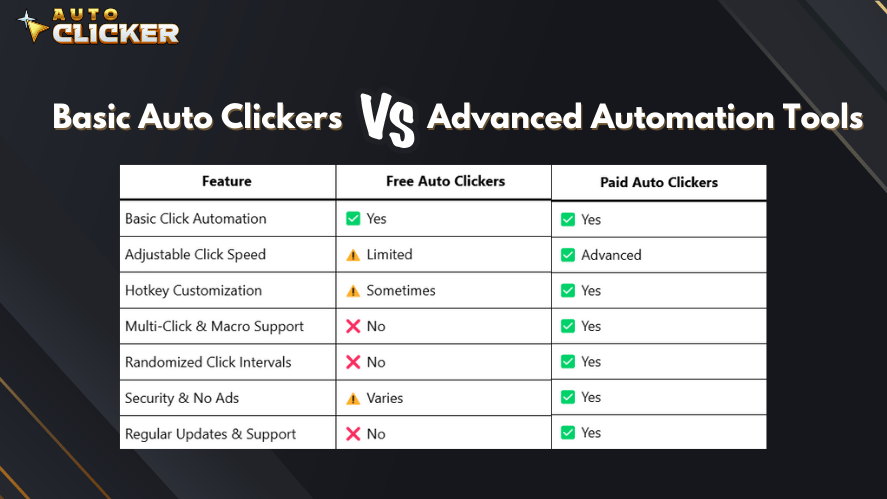
- Basic Auto Clickers: These tools primarily perform simple, repetitive mouse clicks at a set interval. They are ideal for basic automation tasks, but they lack advanced functionality.
- Advanced Automation Tools: In contrast, these tools offer much more than just clicking. They can execute keystrokes, record a macro, and even simulate human-like interaction, making them useful for more complex automation needs.
| Type | Best For | Main Benefit |
|---|---|---|
| Basic auto clickers | Simple repeated clicking | Easy setup |
| Advanced automation tools | Clicks, key presses, and macros | More control |
| Gaming auto clickers | Idle games and repetitive inputs | Faster gameplay actions |
| Accessibility-focused tools | Reducing manual strain | Easier computer use |
Because each tool works differently, it is important to choose one that matches your device, skill level, and purpose.
How Auto Mouse Clickers Work
Auto mouse clickers function by automating input commands using pre-set parameters. To better understand how they work, let’s break down their core functionality:
Key Features of an Auto Mouse Clicker:
- Adjustable Click Speed – Configure click intervals from milliseconds to seconds.
- Custom Hotkeys – Set up keyboard shortcuts for instant activation and deactivation.
- Multiple Click Types – Automate left, right, and middle mouse button clicks.
- Keystroke Automation – Program key presses alongside mouse clicks for advanced automation.
- Click Patterns & Macros – Record custom sequences of clicks and keystrokes for complex tasks.
Most automatic clicker tools run in the background, allowing users to perform other tasks while automation is active.
Best Uses for an Auto Mouse Clicker in 2026
An auto mouse clicker can help in different situations. However, it should always be used responsibly, especially in games or apps with rules against automation.
Gaming
Many players use auto clickers for idle games, clicker games, and resource collection. For instance, an auto mouse clicker can reduce the need for constant manual clicking in games where repeated input is part of the gameplay.
However, not every game allows automation. Therefore, always check the game’s rules before using an auto clicker in online or competitive games.
Productivity
Auto clickers can also help with repetitive computer tasks. For example, they may be useful for form testing, repeated button clicks, basic data entry, or workflow checks.
As a result, users can save time and focus on tasks that need more attention.
Accessibility
For some users, repeated clicking can cause discomfort or fatigue. In this case, an auto mouse clicker may help reduce strain and make computer use more comfortable.
This can be helpful for users who need easier ways to interact with software, websites, or simple desktop tasks.
Benefits of Using an Auto Mouse Clicker
1. Gaming Optimization 🎮
Auto clickers are popular among gamers, especially for:
- ✅ Idle & Clicker Games – Automate clicking to progress faster in clicker games like Cookie Clicker or Adventure Capitalist.
- ✅ AFK Farming – Set up an auto clicker for android games to collect resources passively.
- ✅ Competitive Play – Some players use auto clickers for fast clicking in FPS and RTS games (note: check the game’s policy to avoid bans).
An android auto clicker is especially useful for mobile gamers who want to automate taps in idle and gacha games.
2. Productivity Enhancement 💼
Beyond gaming, auto clickers streamline repetitive tasks, improving productivity in various fields:
- ✔️ Software Testing – Automate UI testing and repetitive actions in software development.
- ✔️ Data Entry – Speed up repetitive data entry tasks.
- ✔️ Web Browsing – Auto-refresh pages, click through links, or automate form submissions.
A smart auto clicker can be programmed to handle complex automation workflows, reducing manual effort.
3. Accessibility Support 🖱️
For individuals with mobility impairments, auto clickers provide essential accessibility support by:
🖥️ Reducing strain from constant clicking. ♿ Customizing controls for ease of use. 🔧 Allowing alternative input methods like voice commands or adaptive switches.
Using an auto clicker for MacBook can make Mac-based workflows easier for users with physical limitations.
How to Use an Auto Mouse Clicker for Click and Key Press Automation
Setting up an auto mouse clicker is straightforward. Follow these steps to automate clicks and key presses:
1. Download & Install
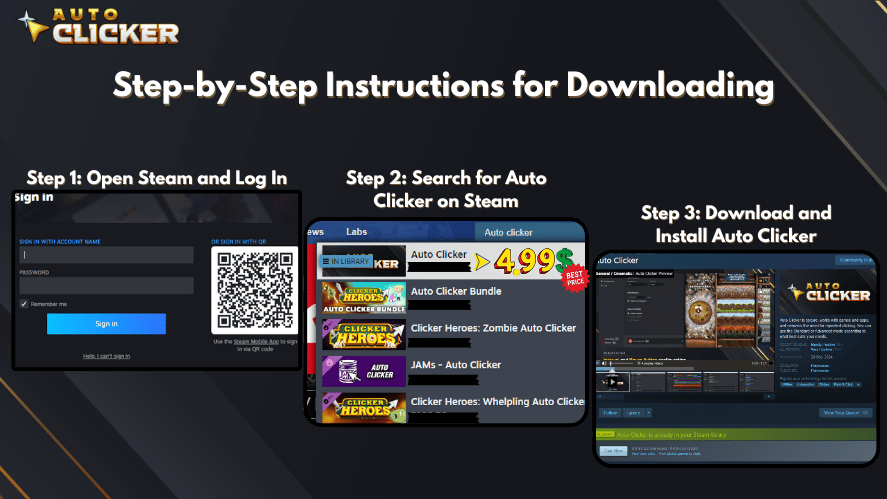
Choose a reliable auto clicker such as Auto Clicker on Steam or a trusted third-party tool.
2. Set Click Actions
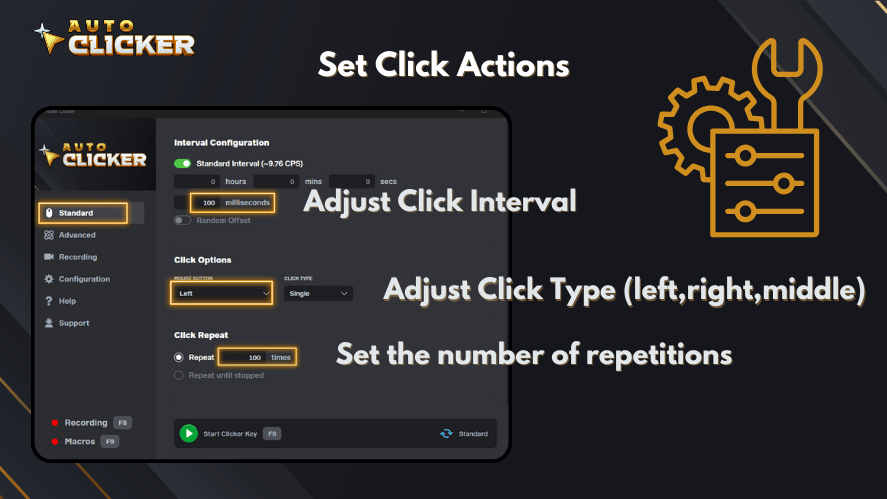
Configure:
- Click type (left, right, middle).
- Click interval (milliseconds, seconds).
- Number of clicks per cycle.
3. Automate Keystrokes
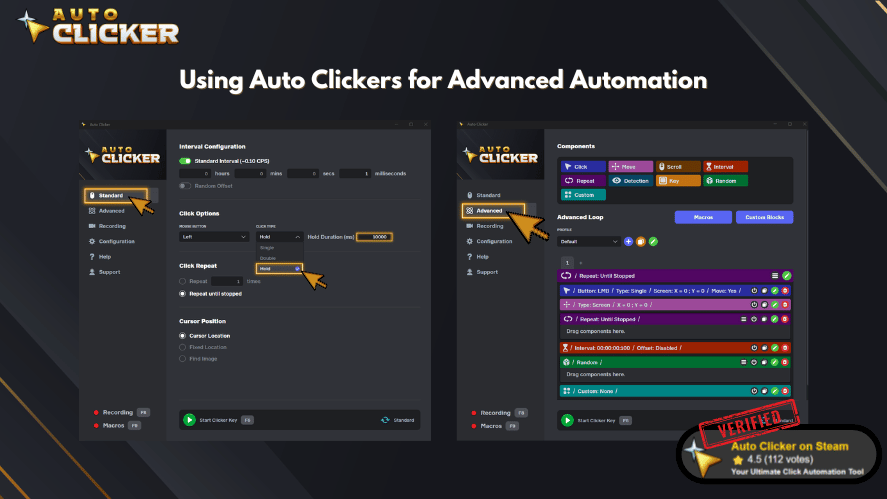
Many auto clickers allow users to automate key presses alongside clicks, useful for gaming macros or scripting workflows.
4. Start & Stop Easily
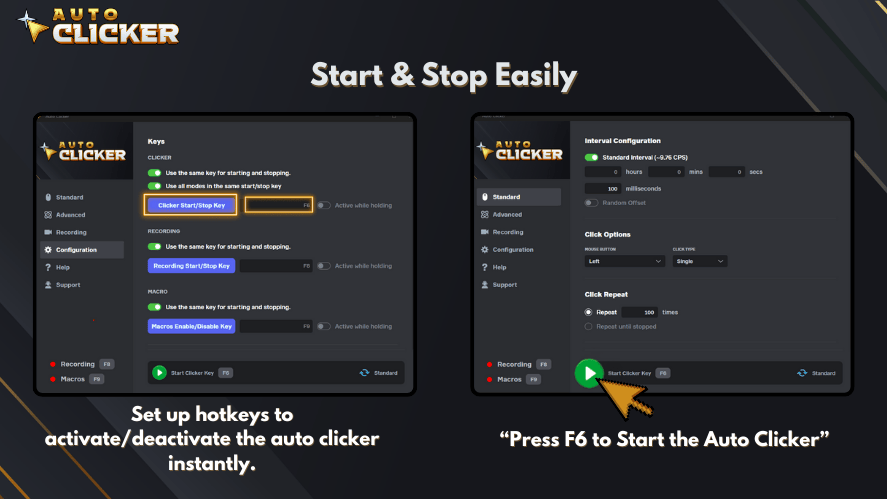
Set up hotkeys to activate/deactivate the auto clicker instantly.
5. Fine-tune Settings
Customize advanced options like:
- Randomized click delays (to mimic human behavior).
- Click patterns (useful for repetitive software tasks).
- Multi-location clicks (click on different areas of the screen).
Choosing the Right Auto Mouse Clicker
When selecting an auto clicker, consider these factors:
1. Ease of Use
- A user-friendly interface makes setup simple.
- A best auto clicker for Windows should have clear settings and hotkey options.
2. Customization Options
- Look for adjustable click speeds, macro recording, and key press automation.
- Advanced auto clickers support scripting for complex tasks.
3. Compatibility
- Ensure it works on your OS (Windows, macOS, Android).
- If you’re using a Mac, an auto clicker for Mac is necessary.
4. Performance & Efficiency
- Low CPU usage is important, especially for gaming.
- A smart auto clicker should function without slowing down your system.
Why Auto Clicker on Steam?
- Reliable and widely used.
- Offers extensive customization.
- Compatible with most applications and games.
If you’re looking for a get free automatic clicker, ensure it’s from a trusted source to avoid malware.
FAQs About Auto Mouse Clickers
An auto mouse clicker is used to automate repeated mouse clicks or key presses. It can help with gaming, software testing, productivity tasks, and accessibility needs.
Yes, an auto mouse clicker can be safe if you download it from a trusted source. However, avoid unknown downloads because they may contain malware or unwanted software.
Yes, you can use it for some games, especially idle and clicker games. However, always check the game’s rules because some online or competitive games may not allow automation.
Look for adjustable click speed, hotkeys, click type options, keystroke automation, macro support, and compatibility with your device.
Yes, many advanced auto clickers can automate both mouse clicks and key presses. This is useful for gaming macros, software testing, and repetitive workflows.
Conclusion
An auto mouse clicker is a helpful tool for automating repetitive clicks and key presses. It can support gaming, productivity, software testing, and accessibility needs.
However, the best tool depends on how you plan to use it. For simple tasks, a basic auto clicker may be enough. For advanced workflows, look for features like hotkeys, macros, click patterns, and keystroke automation.
In 2026, tools like Auto Clicker on Steam remain useful for users who want a reliable way to automate repeated actions. Before using any auto clicker, make sure it comes from a trusted source and follow the rules of the apps or games you use.
Try an auto mouse clicker today and experience the convenience of automation!

What Is a Millisecond? Guide to Gaming, Automation & Speed

Auto Clicker Steam: The Ultimate Tool for Gamers and Productivity

Best Auto Clicker for Android and iOS in 2026
About The Author
