
Mac Auto Clicker Now Available: Patch 2.0.7 Auto Clicker on Steam
A mac auto clicker is now more useful than ever thanks to the latest Auto Clicker on Steam update. While Patch 2.0.7 introduced macOS support, Patch 2.0.8 takes the tool even further with cloud saves, Steam Workshop support, multiple image detection, OCR text detection for Windows, and a new Stop Block for better automation control.
For Mac users, this matters because reliable auto clicker tools on macOS have not always been easy to find. In the past, many users had to rely on third-party downloads that were either outdated, difficult to use, or not always trustworthy. However, Auto Clicker on Steam gives users a safer and more convenient way to automate repetitive clicks through a familiar platform.
In this updated 2026 guide, we will cover what changed in Patch 2.0.8, why Auto Clicker on Steam is important for Mac users, how to get started, and what features make it stand out from other macOS auto clicker options.
Auto Clicker on Steam Patch 2.0.8: What’s New?
Patch 2.0.8 was released on June 11, 2026, and it adds several major improvements to Auto Clicker on Steam. Although macOS support was already introduced in Patch 2.0.7, this new update improves the overall experience for users who want better syncing, sharing, detection, and automation control.
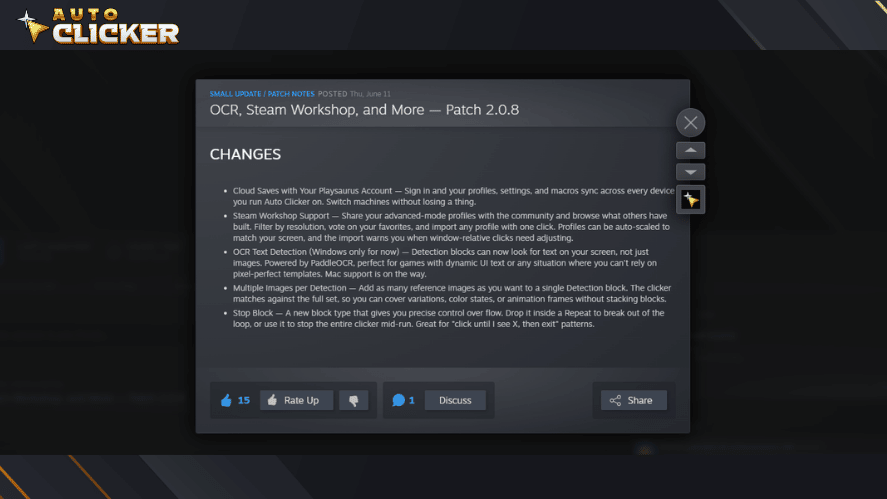
Because of these changes, Auto Clicker on Steam is no longer just a basic clicking tool. Instead, it is becoming a more advanced automation platform for gamers, testers, and productivity users.
Key Features Added in Patch 2.0.8
Patch 2.0.8 introduces several important features. Some are available across the tool, while others are currently limited to Windows. However, the update still benefits Mac users because cloud syncing, profile sharing, and improved workflow control make the software more flexible overall.
Cloud Saves With Your Playsaurus Account
One of the biggest additions in Patch 2.0.8 is cloud save support through a Playsaurus account. After signing in, your profiles, settings, and macros can sync across devices.
This is helpful if you use Auto Clicker on more than one machine. For example, you can create a profile on one device and then access it later on another device without rebuilding everything manually.
This feature is especially useful for users who:
- Switch between multiple computers
- Use Auto Clicker for different games or apps
- Want to save advanced profiles safely
- Prefer not to recreate macros from scratch
As a result, Auto Clicker on Steam becomes easier to manage over time.
Steam Workshop Support
Patch 2.0.8 also adds Steam Workshop support. This means users can share advanced-mode profiles with the community and browse profiles made by other users.

This feature is valuable because it makes automation more beginner-friendly. Instead of building every setup from zero, users can import a profile and adjust it to their needs.
Steam Workshop support includes:
- Community profile sharing
- Resolution filters
- Voting on favorite profiles
- One-click profile imports
- Auto-scaling for different screen resolutions
- Import warnings for window-relative clicks that may need adjustment
Because of this, Steam Workshop support can save time and help users learn from other automation setups.
OCR Text Detection
Patch 2.0.8 introduces OCR text detection for Windows. This feature allows Detection blocks to identify text on the screen instead of relying only on images.
This is useful for games and apps with dynamic UI text. For example, some menus, rewards, alerts, or status messages may change often. In those cases, image detection may not always be enough.
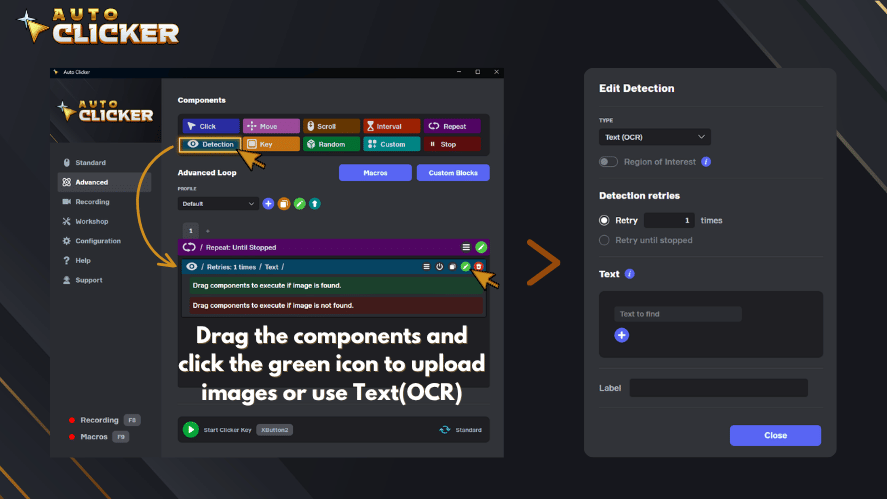
The OCR system is powered by PaddleOCR. However, OCR text detection is currently Windows only. Mac support is not available yet, but it is planned for the future.
For Mac users, this is still worth watching because OCR could become a powerful feature once it arrives on macOS.
Multiple Images per Detection
Another useful improvement is multiple image support for a single Detection block. Instead of creating many separate Detection blocks for different image variations, users can now add several reference images to one block.
This is helpful when a button, icon, or game element changes appearance. For example, the color may shift, the animation may move, or the UI may display different states.
With multiple images per Detection, users can cover:
- Different button colors
- Animation frames
- UI variations
- Hover states
- Game menu changes
- Similar visual targets
As a result, advanced automation becomes cleaner and easier to organize.
Stop Block
Patch 2.0.8 also adds a new Stop Block. This feature gives users more control over how automation flows.
For example, you can place a Stop Block inside a Repeat block to break out of a loop. You can also use it to stop the entire clicker during a running sequence.
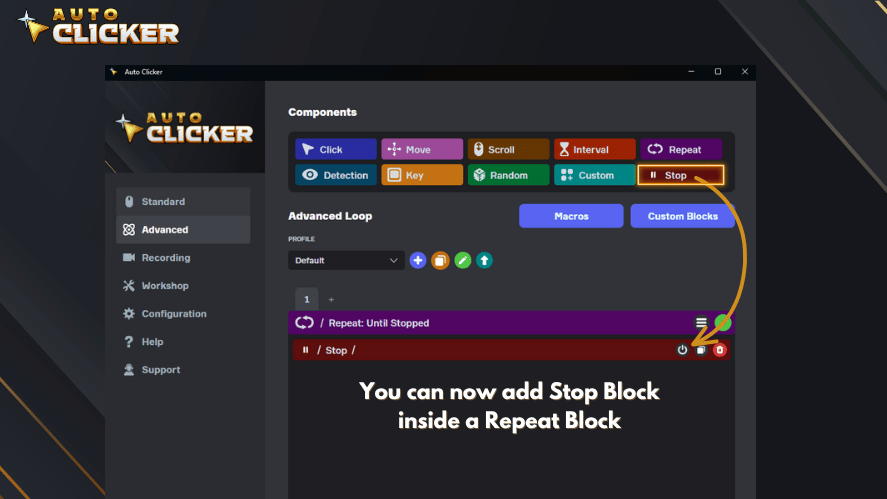
This is useful for automation patterns like:
- Click until a certain image appears
- Repeat until a task is complete
- Stop when a target condition is met
- Exit a loop after detecting a specific screen state
Because of this, the Stop Block makes Auto Clicker on Steam more precise and flexible.
Patch 2.0.7 vs Patch 2.0.8: What Changed?
Patch 2.0.7 was important because it brought Auto Clicker on Steam to macOS. However, Patch 2.0.8 focuses more on advanced automation, sharing, syncing, and detection.
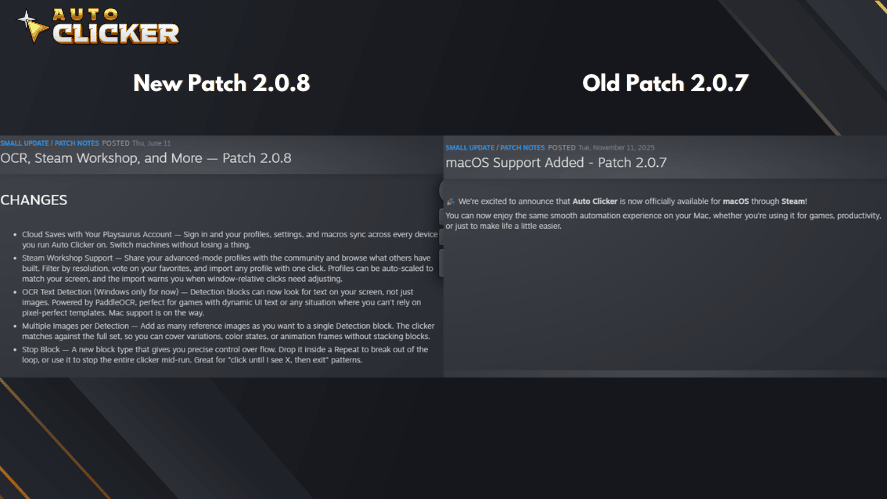
Here is a simple comparison:
| Update | Main Focus | Key Improvements |
|---|---|---|
| Patch 2.0.7 | macOS support | Mac compatibility, Steam access, UI improvements, better hotkeys, stability updates |
| Patch 2.0.8 | Advanced automation features | Cloud saves, Steam Workshop support, OCR text detection, multiple images per Detection, Stop Block |
In short, Patch 2.0.7 opened the door for Mac users. Meanwhile, Patch 2.0.8 improves how users save, share, build, and control their automation profiles.
Why This Mac Auto Clicker Update Matters
Auto clicker tools have been popular for years. However, Mac users often had fewer safe and reliable options compared to Windows users. Because of this, many macOS users had to search for random downloads online.
That can be risky. Some free auto clicker tools may be outdated, unsupported, or difficult to trust. Therefore, having Auto Clicker available through Steam gives Mac users a more convenient option.
Benefits for Mac Users
Auto Clicker on Steam helps Mac users by offering:
- A safer way to install an auto clicker
- Steam-based access and updates
- Better profile management
- Support for automation workflows
- Useful options for games, testing, and productivity
- A cleaner alternative to random third-party downloads
Because the tool is available through Steam, users can manage it from the same platform they already use for games and software.
Why Auto Clicker Is a Game-Changer for Mac Users
With its new macOS compatibility, Auto Clicker is no longer just for PC users. Let’s break down why this matters so much for Mac users across different scenarios:
Gaming Enhancements
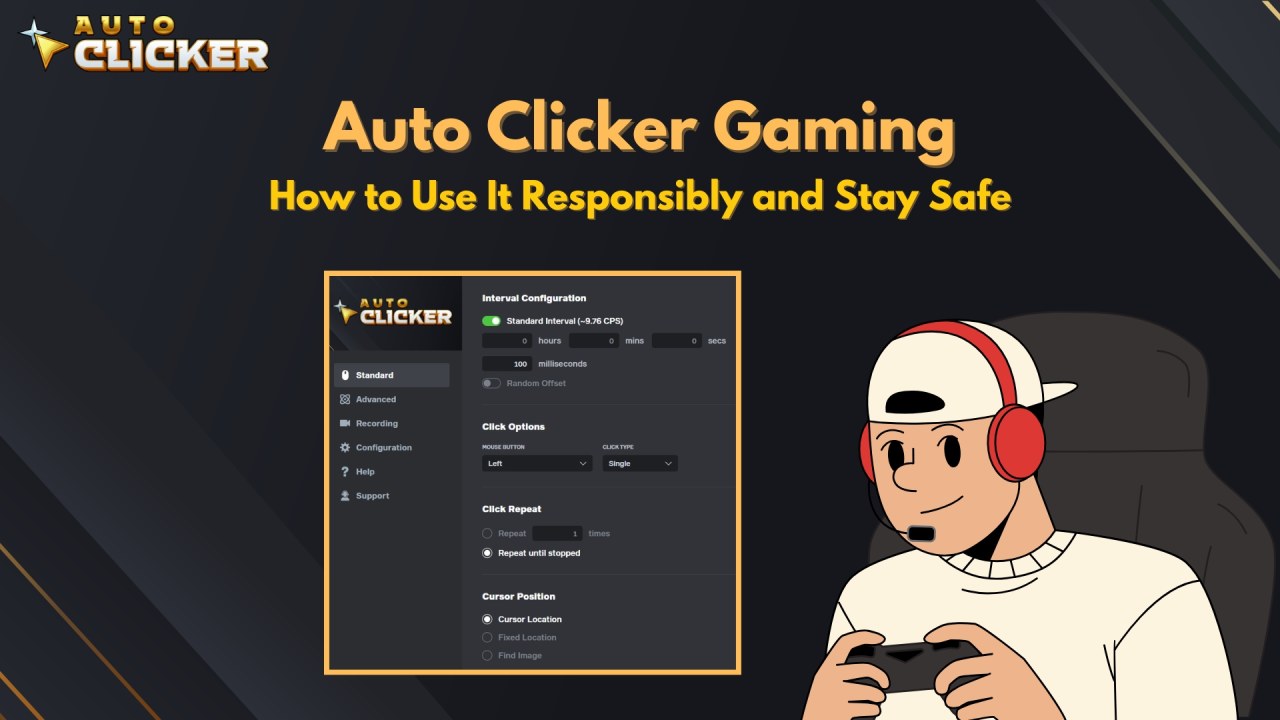
autoclicker mac tools are often used to automate gameplay elements that involve rapid or repeated clicking. This makes them incredibly useful in games like:
- Idle or Incremental Games: Where resources depend on continual mouse clicks.
- MMORPGs: For automating grinding or repetitive skill-based actions.
- Clicker and Tycoon Games: To speed up progress without the physical toll.
Benefits include:
- Eliminating finger fatigue or repetitive strain.
- Maintaining game activity while multitasking.
- Configurable settings for precise timing, intervals, and click duration.
With Auto Clicker for mac, gamers now have access to a safe auto clicker that’s fully integrated with Steam removing the need for shady third-party downloads.
Productivity Tools for macOS
Auto Clicker on Steam is not only for games. It can also help with productivity tasks that involve repetitive clicking.
Many office workers, developers, and testers repeat the same actions many times during the day. Because of this, automation can save time and reduce errors.

Beyond gaming, a macOS autoclicker can supercharge productivity by automating tedious, repetitive tasks such as:
- Form filling and testing in browsers or applications.
- Bulk processing actions in design or spreadsheet apps.
- Automated clicking for UI testing or code deployments.
For example, a QA tester may need to click the same button many times to check stability. Instead of doing it manually, they can use an auto clicker to repeat the action consistently.
As a result, the task becomes faster and easier to measure.
Accessibility Benefits
Auto clickers can also support accessibility. For some users, repeated clicking can be painful, tiring, or difficult. Therefore, automation can make computer use more comfortable.
Auto Clicker on Steam may help users who need:
- Fewer repeated hand movements
- Hotkey-based activation
- Custom click intervals
- More control over repetitive input
- Reduced strain during long sessions
However, an auto clicker should not replace proper ergonomic habits. Users should still take breaks, stretch, and use a comfortable mouse or trackpad setup.
How to Download and Use Auto Clicker on macOS via Steam

Getting Auto Clicker on macOS is now simple because it is available through Steam.
Quick Setup Guide
Follow these steps:
- Install Steam on your Mac.
- Log in to your Steam account.
- Search for “Auto Clicker” in the Steam Store.
- Download and install the application.
- Open Auto Clicker from your Steam Library.
- Set your click interval, click type, and repeat options.
- Choose your hotkey.
- Start automating your repetitive clicks.
Because the tool is installed through Steam, setup is easier than downloading software from unknown websites.
Mac System Requirements
To run Auto Clicker on Mac, make sure your device meets the required specs.
Minimum Requirements
| Requirement | Minimum |
| Processor | Apple Silicon, Apple M-series chip |
| Operating System | macOS 14 |
| Memory | 1 GB RAM |
| Storage | 500 MB available space |
Recommended Requirements
| Requirement | Recommended |
| Processor | Apple Silicon, Apple M-series chip |
| Operating System | macOS 14 |
| Memory | 4 GB RAM |
| Storage | 500 MB available space |
For basic use, the minimum requirements should be enough. However, if you plan to use more advanced features, the recommended specs can provide a smoother experience.
Tips for Better Auto Clicker Performance on Mac
After installing Auto Clicker on Steam, you can improve your experience by setting it up correctly.
Useful Setup Tips
Try these tips:
- Create separate profiles for different games or apps
- Use hotkeys to start and stop automation quickly
- Set safe click intervals instead of using extreme speeds
- Test your profile before running it for a long session
- Save your profiles through your Playsaurus account
- Use Steam Workshop profiles carefully and adjust them when needed
- Review window-relative clicks after importing profiles
These small steps can help prevent mistakes and make your automation setup more reliable.
Auto Clicker on Steam vs Other Mac Auto Clickers
There are other auto clicker tools for Mac, but not all of them offer the same level of convenience. Some are outdated, while others require downloads from websites that users may not fully trust.
Here is a clearer comparison:
| Feature | Auto Clicker on Steam | Other Free Mac Auto Clickers |
| macOS Support | Supports modern macOS requirements | May be outdated or inconsistent |
| Installation | Installed through Steam | Often downloaded from third-party sites |
| Updates | Available through Steam | May not receive regular updates |
| Profiles | Supports profiles and advanced setups | Often limited |
| Cloud Saves | Available with Playsaurus account | Usually not available |
| Community Sharing | Steam Workshop support | Usually not available |
| Safety | More convenient through Steam | Depends on the download source |
| Advanced Features | Detection blocks, macros, Stop Block, image detection | Often basic clicking only |
Because of these differences, Auto Clicker on Steam is a strong option for users who want a safer and more organized mac auto clicker.
Important Note About OCR on Mac
Patch 2.0.8 adds OCR text detection, but this feature is currently Windows only. That means Mac users cannot use OCR text detection yet.
However, Mac support is planned for the future. Therefore, Mac users should keep an eye on future updates if they want text-based detection features.
For now, Mac users can still benefit from other Patch 2.0.8 improvements, including cloud saves, Steam Workshop support, multiple images per Detection, and the Stop Block.
Safe and Responsible Use
Auto clickers should be used responsibly. Although they can save time and reduce strain, they should not be used to gain unfair advantages.
Best Practices
Use Auto Clicker on Steam for:
- Single-player games
- Idle games
- Productivity tasks
- Software testing
- Accessibility support
- Approved automation workflows
Avoid using auto clickers in:
- Competitive multiplayer games
- Ranked matches
- Games with strict anti-cheat rules
- Apps or platforms that prohibit automation
By following these rules, users can enjoy automation while avoiding unnecessary risks.
What Users Are Saying
Although the update was only released on November 11, the early response from Mac users has been overwhelmingly positive:
⭐⭐⭐⭐⭐ “Finally a Mac version! Works just as smoothly as on my Windows PC. Perfect for incremental games!” – Steam User Review
⭐⭐⭐⭐ “Great for accessibility. I use it to replace repetitive clicks in design apps. No issues so far.” – Reddit Comment
⭐⭐⭐⭐⭐ “Easy to install and configure. The Steam integration makes it trustworthy compared to sketchy downloads.” – Discord Feedback
The common consensus? It’s fast, safe, and fills a long-overdue gap for mac auto clicker tools.
FAQs About Mac Auto Clicker and Patch 2.0.8
Yes, Auto Clicker on Steam supports Mac after the Patch 2.0.7 update. Patch 2.0.8 then added more features, including cloud saves, Steam Workshop support, multiple image detection, and the Stop Block.
Patch 2.0.8 adds cloud saves with a Playsaurus account, Steam Workshop support, OCR text detection for Windows, multiple images per Detection, and the new Stop Block.
Not yet. OCR text detection is currently Windows only. However, Mac support is planned for a future update.
Auto Clicker on Steam is a more convenient option because it is installed through Steam instead of random third-party download sites. However, users should still use automation responsibly and follow app or game rules.
Yes. Patch 2.0.8 adds Steam Workshop support, allowing users to share advanced-mode profiles and import community-made profiles.
Cloud saves let users sync profiles, settings, and macros through a Playsaurus account. As a result, you can switch devices without losing your setup.
Conclusion: A Win for the macOS Community
A mac auto clicker is now easier to access thanks to Auto Clicker on Steam. Patch 2.0.7 brought official macOS support, while Patch 2.0.8 added important new features that make the tool more powerful and flexible.
With cloud saves, users can sync their profiles across devices. In addition, Steam Workshop support makes it easier to share and import advanced automation setups. Multiple images per Detection also improve visual matching, while the Stop Block gives users better control over automation flow.
Although OCR text detection is currently Windows only, Mac support is on the way. Therefore, Mac users still have a strong reason to follow future Auto Clicker on Steam updates.
Overall, Auto Clicker on Steam is a safer and more convenient option for Mac users who want to automate repetitive clicks in 2026. Whether you use it for idle games, productivity, software testing, or accessibility, it offers stronger control, smoother performance, customizable settings, and a cleaner way to click smarter without relying on risky third-party downloads.
Ready to simplify your digital workflow or enhance your gaming performance? Try Auto Clicker on Steam for the full auto clicker experience on macOS. However, if you only want to test basic clicking first, you can also visit AutoClicker.com and try the free limited version before moving to the full experience.

Auto Clicker App Reviews: Top Tools Gamers Shouldn’t Miss

Auto Click Macro: How to Use It for Gaming Like a Pro

Auto Clicker with Random Intervals for Safety Automation
About The Author
