
Safe Auto Clicker: Avoid Malware with Steam’s Trusted Option
Finding a safe auto clicker in 2026 is more important than ever because many users still download automation tools from random websites without checking the risks first. Auto clickers can help with gaming, productivity, testing, and repetitive tasks. However, unsafe downloads may expose your computer to malware, spyware, adware, or unwanted programs.
That is why choosing a trusted auto clicker matters. Instead of relying on unknown download pages, users should look for platforms with reviews, updates, developer information, and clear installation steps. Steam’s Auto Clicker is one option because it is available through a familiar platform and includes useful automation features for games, Windows apps, and web-based tasks.
In this guide, we’ll explain what makes an auto clicker safe, why risky downloads should be avoided, and how Steam’s trusted option can help users automate clicks with more confidence.
What Makes a Safe Auto Clicker in 2026?
A safe auto clicker should do more than repeat mouse clicks. It should also come from a trusted source, provide clear software details, and give users control over how automation works.
When choosing an auto clicker, look for these safety signs:
- Trusted download source: Use platforms like Steam instead of unknown file-sharing websites.
- Visible user reviews: Reviews help you see if other users report bugs, suspicious behavior, or poor performance.
- Regular updates: Updated software is usually safer than abandoned tools.
- Clear developer information: A real developer or publisher adds more trust than anonymous downloads.
- No cracked versions: Modified or “premium unlocked” copies often carry the highest malware risk.
- Simple uninstall option: A safe tool should be easy to remove if you no longer need it.
Because of these factors, Steam can be a better choice for users who want a safe auto clicker download without searching through risky third-party websites.
Why Safety Matters in Auto Clicker Downloads

The Dangers of Downloading from Unverified Sources
Many users search for an auto clicker download safe option. But not all sources are secure. Downloading from random websites can lead to:
- Viruses and Malware – Some auto clickers come with hidden malicious files that can steal your data.
- Spyware and Adware – These programs track your activities or flood your computer with unwanted ads.
- System Performance Issues – A poorly coded auto clicker can slow down your PC or make it crash.
- Ransomware Threats – Some fake tools lock your files and demand payment to unlock them.
Clearly, downloading an auto clicker from an untrusted source is risky. But how do you find a safe auto clicker?
How to Find a Safe Auto Clicker
To avoid security threats, follow these important safety tips:
✔ Download from Trusted Platforms – Steam is one of the safest places to get an auto clicker. Other trusted sources include the Microsoft Store and GitHub.
✔ Check User Reviews – Always read what other users say. If there are too many complaints, it’s best to avoid that tool.
✔ Scan for Viruses – Before installing, run a quick antivirus scan on the file.
✔ Avoid “Cracked” Versions – Free or modified versions often contain malicious code.
By following these steps, you can ensure auto clicker safety and keep your computer protected.
Safe Auto Clicker Checklist Before Downloading
Before installing any auto clicker, take a few minutes to check if it is safe. This simple checklist can help you avoid risky downloads.
| Safety Check | Why It Matters |
|---|---|
| Download from a trusted platform | Helps reduce the risk of malware or fake installers |
| Read recent reviews | Shows if users are reporting problems |
| Avoid cracked versions | Modified files may contain hidden threats |
| Check update history | Updated tools are more likely to fix bugs and security issues |
| Scan the installer | Adds another layer of protection before installation |
| Review permissions | Helps you understand what the software can access |
Even if a tool looks useful, do not install it right away if the website feels suspicious, has too many pop-ups, or forces you to download extra files.
Why Steam’s Auto Clicker is the Safest Choice
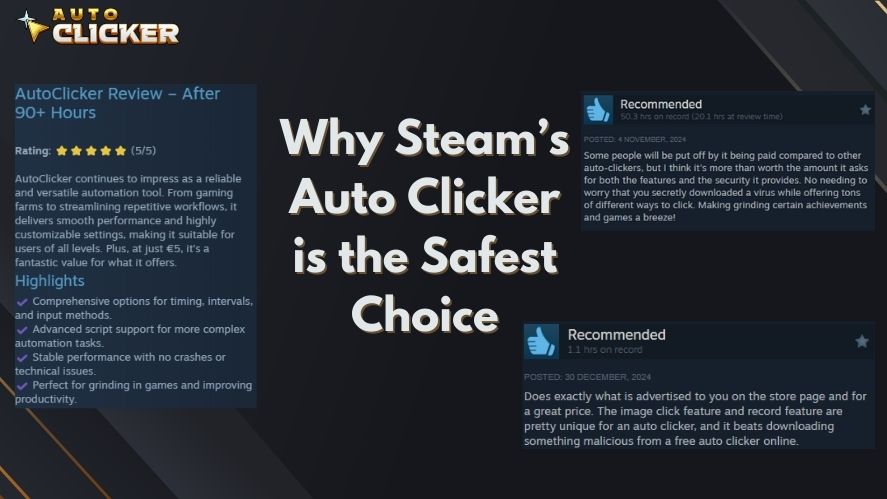
Verified by Steam: A Secure Platform
Steam is known for its strict security measures. Every application on the platform goes through a verification process before being published. This means:
- No malware or spyware – Steam ensures its apps are safe to use.
- Developer authentication – Only verified developers can list software.
- Community feedback – Real users leave honest reviews, so you can see if the tool is reliable.
By choosing an auto clicker from Steam, you get a secure and trusted tool without worrying about malware.
Frequent Updates Keep It Safe
Steam’s Auto Clicker gets regular updates that:
- Fix security issues before they become a problem.
- Improve performance for smoother automation.
- Add new features based on user feedback.
Unlike other tools, which may become outdated or vulnerable, Steam ensures that its auto clicker stays safe and up to date.
Community Reviews Provide Extra Security
Another reason Steam’s auto clicker is a safe choice is its active community. If a problem arises, users report it quickly. You can check reviews and discussion threads before downloading to see if others have had a good experience.
Why Steam’s Auto Clicker Fits Current Search Intent
Most people searching for a safe auto clicker want three things: security, easy setup, and useful features. Steam’s Auto Clicker matches that intent because it gives users a trusted place to download the software and a clear way to manage updates.
Steam also makes it easier to check user feedback before installing. As a result, users can make a more informed decision instead of guessing whether a random download page is safe.
Steam’s Auto Clicker is useful for:
- Steam games
- PC games
- Windows apps
- Web-based games
- Repetitive productivity tasks
- Basic testing and automation workflows
However, users should still use it responsibly. Some games and apps may not allow automation, especially in competitive or online environments. Therefore, always check the rules of the game or platform before using any auto clicker.
Safe Does Not Mean Risk-Free in Every Situation
A safe auto clicker can help reduce malware risk, but it does not automatically mean every use is allowed. For example, some online games may restrict automation because it can create unfair advantages. Other apps may also have rules against automated actions.
Before using any auto clicker, check these points:
- Does the game or app allow automation?
- Are you using it in single-player or competitive mode?
- Could it affect other players?
- Are you using reasonable click intervals?
- Are you following the platform’s terms of service?
This matters because safe software and safe usage are two different things. A trusted auto clicker can protect your computer, but responsible use protects your account.
Best Features: Image Click and Record Options

Image Click: Click Based on Visual Triggers
One of the most powerful features of Steam’s best auto clicker software is Image Click. Instead of clicking at a fixed spot, it detects an image on your screen and clicks when it appears.
How is this useful?
- Gaming – Automate in-game actions, like collecting rewards or attacking enemies.
- Office Work – Speed up tasks by automating button clicks in software programs.
- Data Entry – Reduce errors by automating repetitive form submissions.
With Image Click, your auto clicker works intelligently instead of just clicking blindly.
Record and Replay: Save Time with Automation
Another great feature is Record and Replay, which allows you to record a series of mouse clicks and keystrokes. Then, you can play them back automatically.
Why is this helpful?
Gaming – Repeat in-game actions without manually clicking every time.
Productivity – Automate multi-step processes in office work.
Efficiency – Reduce fatigue by letting the software do the repetitive work for you.
These features make Steam’s auto clicker one of the most advanced and user-friendly options available.
Best Safe Uses for an Auto Clicker
A safe auto clicker is most useful when it handles simple, repetitive actions that do not break platform rules. It can reduce hand strain, save time, and make routine tasks easier.
Here are some safer use cases:
- Repeating simple clicks in single-player games
- Automating basic testing steps
- Clicking through repetitive app menus
- Handling non-sensitive browser tasks
- Repeating personal productivity workflows
- Practicing automation setups in a controlled environment
For best results, start with slow click intervals. Then, adjust the settings only when needed. This helps avoid mistakes, crashes, or unwanted actions.
How to Safely Download Auto Clicker on Steam

Step-by-Step Guide to a Safe Download
Here’s how to download an auto clicker safely from Steam:
1️⃣ Go to the Steam Website – Visit store.steampowered.com.
2️⃣ Sign in or Create an Account – You need a Steam account to download software.
3️⃣ Search for “Auto Clicker” – Find Steam’s trusted version.
4️⃣ Click “Download” and Install – This ensures you get a secure and malware-free tool.
5️⃣ Customize Settings – Adjust the speed, interval, and automation settings to your liking.
How to Avoid Dangerous Downloads
🚫 Don’t Download from Unverified Websites – Stick to Steam and other trusted sources.
🛡 Use Antivirus Software – Scan all downloads before installing.
🔍 Check User Reviews – See what others say before installing any software.
By following these steps, you’ll ensure auto clicker safety while getting a reliable and powerful automation tool.
Extra Tips to Avoid Auto Clicker Malware
Even when you are looking for a trusted auto clicker, it is still smart to follow basic safety habits. Malware often appears on fake download pages that copy the names of popular tools.
Use these tips to stay protected:
- Do not download from websites full of pop-ups.
- Avoid files that ask you to disable antivirus protection.
- Do not trust “cracked,” “premium unlocked,” or “modded” versions.
- Check if the download page has real user reviews.
- Keep Windows and your antivirus software updated.
- Remove any tool that causes strange ads, slowdowns, or browser redirects.
These steps can help improve auto clicker malware protection and keep your device safer.
Why a Secure Auto Clicker is Worth It
Using a safe auto clicker offers many benefits, including:
No Security Risks – You won’t have to worry about malware or spyware.
Smooth Performance – Your system will run without slowdowns or crashes.
Community Trust – Steam users leave honest reviews to help you make a smart choice.
Powerful Features – Enjoy image-based clicking and recorded automation.
By choosing Steam’s free and safe auto clicker, you protect your computer while making tasks faster and easier.
Frequently Asked Questions About Safe Auto Clickers
A safe auto clicker is an automation tool that comes from a trusted source, avoids suspicious files, and gives users control over click settings. It should not include malware, spyware, or unwanted programs.
Steam is a trusted platform, so downloading Auto Clicker through Steam is safer than downloading from unknown websites. However, users should still read reviews, check updates, and use the tool responsibly.
Yes. Some auto clickers from unverified websites may contain malware, spyware, adware, or unwanted bundled software. That is why users should avoid random download pages and cracked versions.
You can use an auto clicker for some games, especially single-player or casual games. However, some online or competitive games may not allow automation. Always check the game’s rules first.
Download only from trusted platforms, read recent reviews, avoid cracked versions, scan files before installing, and stay away from websites with pop-ups or forced downloads.
Conclusion
A safe auto clicker can make repetitive tasks easier, but the download source matters. Random websites may offer quick downloads, yet they can also expose users to malware, spyware, adware, or unwanted programs. Because of this, users should be careful before installing any automation tool.
In 2026, Steam’s Auto Clicker is a strong option for users who want a trusted auto clicker with useful features like Image Click, Record and Replay, and customizable automation settings. It also gives users access to reviews, updates, and a familiar download process.
However, safe software should still be used responsibly. Always check the rules of the game or app before using automation. If you want a safe auto clicker download, choosing a trusted platform like Steam is a smarter first step than relying on unknown websites.

Top 5 Auto Clicker Software Solutions for Windows Users

Auto Clickers for Chrome Everything You Need to Know

Top-Rated Auto Clicker Apps in 2026
About The Author
