
Best Free Auto Clicker for Gaming, Testing, and More (Updated for 2026)
This article has been fully updated for 2026 to reflect the latest free auto clicker tools, features, and compatibility improvements for gamers, testers, and productivity users alike.
If you are searching for the best free auto clicker to help with gaming, software testing, or daily computer tasks, you’re in the right place. In 2026, the need for click automation has grown. Many users now rely on auto clickers to save time, reduce repetitive strain, and boost productivity.
Whether you are a gamer trying to farm coins, a developer testing a user interface, or someone trying to automate routine desktop actions, using a free auto clicker can make your life easier.
In this guide, we will explain what an auto clicker is, how it works, and which tools are the best in 2026. We’ll also explore the difference between free and premium tools so you can decide what fits your needs best.
Android users now also have an official mobile option from Playsaurus. Auto Clicker Enhanced is available free through Google Play for supported Android phones and tablets, giving mobile users a dedicated alternative to desktop-only auto clickers.
What’s New in 2026 — Auto Clickers Evolved
In 2026, free auto clicker tools continue to expand support for cross-platform performance, enhanced hotkey customization, and improved safety downloads.
Many modern tools now include better UI workflows, Windows 11/12 compatibility, and mobile tap automation support (e.g., Android auto-tap apps) while maintaining lightweight performance for desktop users. Premium options also emphasize cloud backup and macro support for advanced workflows.
What Is an Auto Clicker and Why Use One?

To begin with, let’s understand what an auto clicker does. At its core, an auto clicker is a tool that automatically simulates mouse clicks for you. Once you set it up, the software will continue clicking based on your settings, without you having to lift a finger.
Why People Use Auto Clickers
There are many reasons people choose to use an auto clicker free program. Some of the most common uses include:
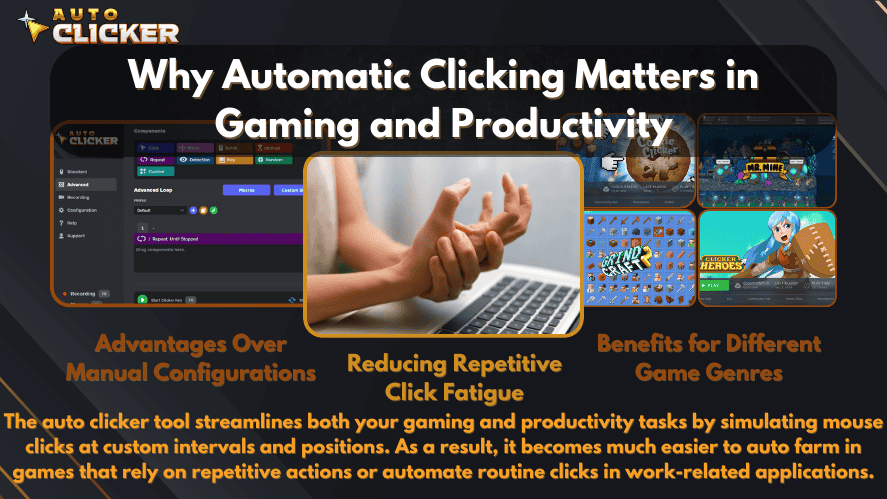
Gaming
Gamers often use auto clickers to save time in idle or click-heavy games. For example:
- In games like Cookie Clicker and Clicker Heroes auto clickers help you earn more points by clicking faster than a human can.
- In Roblox, some players use them to automate actions like mining, building, or farming.
- Idle games and simulators become easier when clicks are automated.
Instead of sitting for hours clicking the same spot, an auto clicker does the work for you.
Testing Software and Apps
Software testers and developers also use auto clickers. When testing user interfaces, repetitive clicking can help reveal bugs or performance issues. Auto clickers simulate real user behavior, which is useful when running tests for long periods.
This saves time and allows testers to focus on bigger problems.
Productivity and Work Tasks
Auto clickers are not just for games or coding. Office workers, students, and freelancers use them to:
- Accept pop-ups
- Click through tutorials or lessons
- Confirm forms
- Refresh pages
If you often repeat the same mouse action throughout your day, a free auto click tool can save you hours over time.
Free vs Premium Auto Clickers
When looking for an auto clicker, you will notice both free and paid options. Knowing the difference will help you choose wisely.
What Free Auto Clickers Offer
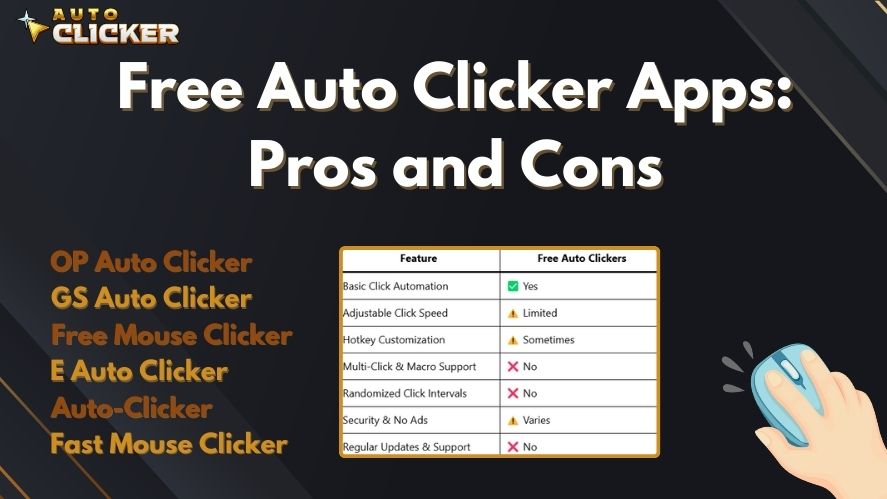
Free auto clickers, like those found on AutoClicker.com, offer all the basic functions most people need:
- Set how fast the clicks happen
- Choose where the clicks should happen
- Assign a hotkey to start or stop clicking
These tools work well for casual gamers or users who just need simple click automation. They are easy to install, safe, and usually lightweight.
When to Consider a Premium Version
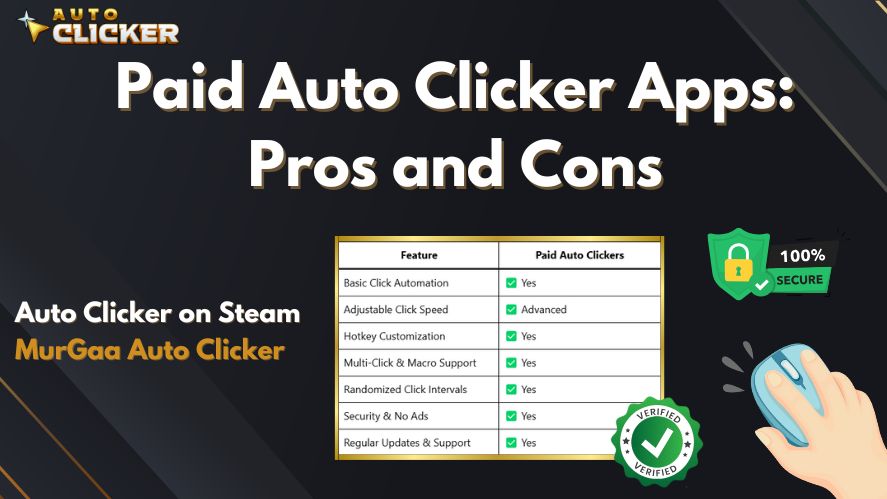
However, some users may need more advanced tools. If you want features like:
- Keyboard input automation
- Custom macros
- Cloud saving
- Better interface and support
Then a premium auto clicker, like the one available on Steam, might be a better choice. Paid versions often provide regular updates, smoother user experience, and better customization.
Summary
To summarize:
| Feature | Free Tools | Premium Tools |
|---|---|---|
| Mouse Click Automation | Yes | Yes |
| Keyboard Input Automation | No | Yes |
| Multi-step Macros | No | Yes |
| Hotkey Support | Basic | Advanced |
| Interface | Simple | Modern and Polished |
| Cloud Save and Support | No | Yes |
Free tools are enough for most beginners. But if your needs grow, you can always upgrade.
Features That Define the Best Free Auto Clicker
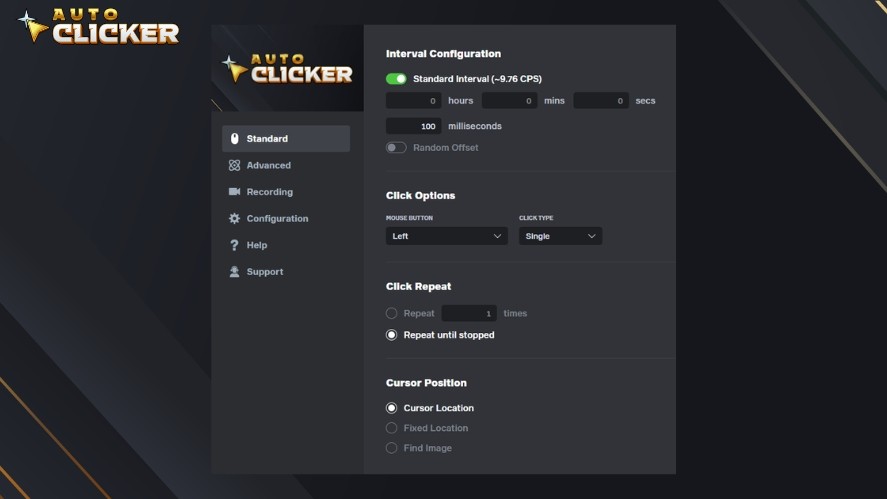
Now that you know what an auto clicker does and how free tools differ from paid ones, let’s look at what makes the best free auto clicker in 2026 stand out.
Whether you’re choosing a free option or considering an upgrade later, make sure these features are available.
1. Easy to Use
A good auto clicker should be simple to install and use. Many users want to set it up in minutes and start clicking right away. Look for tools that:
- Have a clear layout
- Don’t require coding
- Work without needing extra files
AutoClicker.com is a great example. It has a user-friendly design, and you can start using it right after downloading.
2. Adjustable Click Speed
The ability to change how often the clicker clicks is very important. Some tasks need one click every few seconds, while others require many clicks every second.
Auto clickers like Speed Auto Clicker are built for ultra-fast clicking. Others give you full control to slow it down when needed.
3. Hotkey Support
A hotkey lets you start or stop the auto clicker with a button on your keyboard. This feature is essential for convenience, especially during gaming or testing.
Most free tools include this feature. However, the amount of control over which key you assign may vary.
4. Clean and Safe Interface
Nobody wants to download a tool filled with ads or viruses. That’s why it is important to choose software from trusted sources. Always scan downloads and avoid shady websites.
The auto clicker free download from AutoClicker.com is a good example of a clean, trusted option.
5. Lightweight and Reliable
Good auto clickers should not slow down your system. They should run quietly in the background while doing their job. Choose tools that:
- Load quickly
- Don’t require much memory
- Are tested and reviewed by other users
Best Free Auto Clickers in 2026 – Ranked List
Let’s now look at the top free and freemium auto clickers you can use in 2026. Each tool has its strengths. We will go over the features, pros, and ideal use cases for each one.
We’ll start with a quick overview table, then dive into each tool.
Comparison Table: Auto Clickers in 2026
| Auto Clicker Tool | Rating ⭐ | Price | Click Automation | Key Press Support | Hotkeys | UI Simplicity | Advanced Features | Platform |
|---|---|---|---|---|---|---|---|---|
| Auto Clicker Enhanced by Playsaurus | – | Free | ✅ Yes | ⚠️ Varies by mode/features | ✅ Floating controls | ✅ Simple | ⚠️ Free feature set | Android 10+ |
| AutoClicker.com | 4.9 | Free | ✅ Yes | ❌ No | ✅ Yes | ✅ Simple | ❌ No | Windows |
| Auto Clicker on Steam | 4.5 | Premium | ✅ Yes | ✅ Yes | ✅ Yes | ✅ Polished | ✅ Yes | Steam (Windows) |
| OP Auto Clicker | 4.3 | Free | ✅ Yes | ❌ No | ✅ Yes | ✅ Simple | ⚠️ Limited | Windows |
| GS Auto Clicker | 4.0 | Free | ✅ Yes | ❌ No | ✅ Yes | ✅ Very Simple | ❌ No | Windows |
| E Auto Clicker | 3.7 | Free | ✅ Yes | ❌ No | ✅ Yes | ✅ Basic | ❌ No | Windows |
| Auto-Clicker | 3.3 | Free | ✅ Yes | ❌ No | ✅ Yes | ⚠️ Dated | ❌ No | Windows |
| Free Mouse Clicker | 3.9 | Free | ✅ Yes | ❌ No | ✅ Yes | ✅ Simple | ❌ No | Windows |
| Fast Mouse Clicker | 3.6 | Free | ✅ Yes (Fast) | ❌ No | ⚠️ Limited | ⚠️ Cluttered | ⚠️ Experimental | Windows |
1. AutoClicker.com – Best Free Starter Tool (2026 Update)
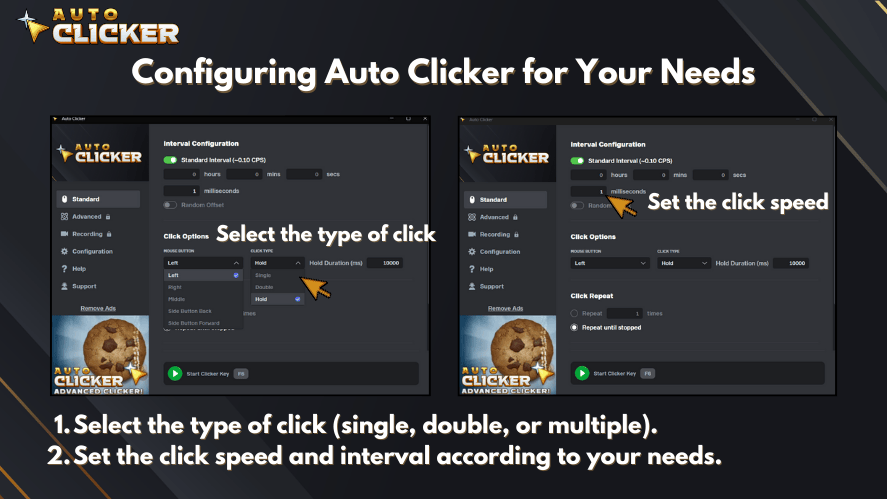
AutoClicker.com remains our top recommendation in 2026 for anyone who wants a safe, free, and beginner-friendly auto clicker. It’s designed for users who just want to install, set a hotkey, and start automating clicks in seconds.
Key features in 2026:
- 100% free to use
- Clean, easy-to-understand layout
- Adjustable click interval settings, from slow to very fast
- Hotkey support for quick start/stop
- Set click intervals
- Lightweight and safe download
It doesn’t include advanced macro recording or keyboard automation, but that’s also why it feels simple and fast. For idle games, testing small UI elements, or routine tasks, AutoClicker.com is still more than enough for most users in 2026.
Tip: Start with AutoClicker.com if you’re new to auto clickers and want the safest place to learn the basics.
Why we recommend it:
This tool is great for beginners. Whether you are automating an idle game or testing a small app, AutoClicker.com will get the job done without slowing down your PC.
👉 Download it free at autoclicker.com
2. Auto Clicker Enhanced by Playsaurus
Android users who want a free mobile auto clicker can now use Auto Clicker Enhanced by Playsaurus, the official free Android version available through Google Play.
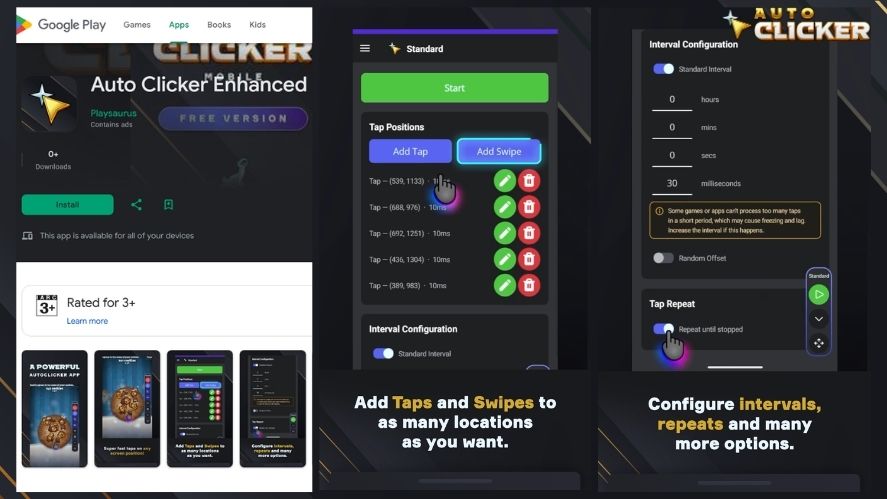
It is designed for supported Android phones and tablets running Android 10 or newer and does not require root access.
Key Features
- Automated taps and swipes
- Adjustable intervals between actions
- Random timing offsets
- Fixed or continuous repetitions
- Floating controls for starting and stopping automation
- Simple setup for common repetitive mobile tasks
- Official distribution through Google Play
- No root required
Auto Clicker Enhanced is a useful option for users who want to automate repetitive actions directly on an Android device instead of relying on a desktop program.
Best for: Android users who need a free, official mobile auto clicker for gaming, testing, or repetitive app interactions.
Get Auto Clicker Enhanced — Free on Google Play
You can also visit the official Auto Clicker download page to find the correct version for your device.
3. Auto Clicker on Steam – Premium Upgrade for Power Users (2026)
Auto Clicker on Steam continues to be the best step-up option in 2026 if you’ve outgrown basic clickers. It adds keyboard input support, macros, and cloud-saved profiles, all wrapped in a polished interface.
Why it stands out in 2026:
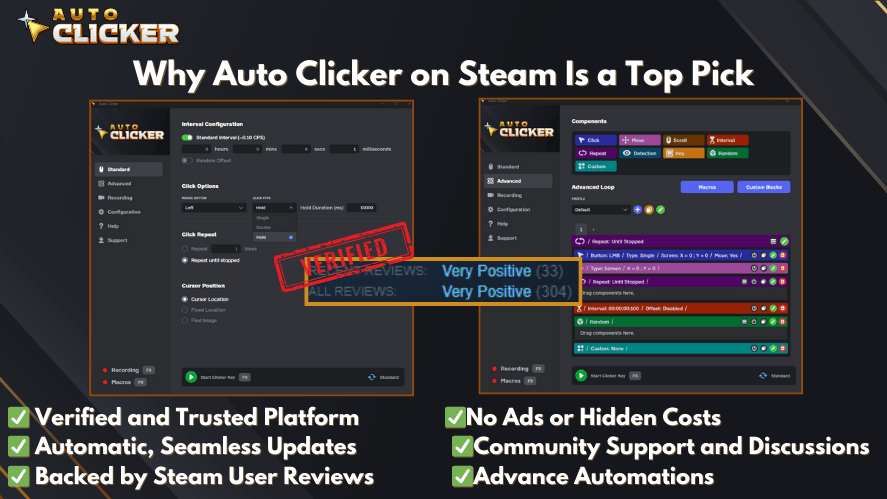
- Mouse + keyboard automation
- You get advanced macro settings
- It supports keyboard input automation
- You can create multi-step actions
- There’s Steam Cloud backup for your settings
- A large community and Discord server can help with support
- Frequent updates and quality-of-life improvements
This version is ideal for players who automate complex game setups, QA testers who need repeatable scripts, or power users running long workflows. It isn’t free, but it’s a one-time purchase that pays off if you rely on automation regularly.
Since it runs through Steam, you can trust the source. There are no unwanted extras or risky downloads.
If you already like the free AutoClicker.com tool and want “more of everything,” the Steam version is still the logical upgrade in 2026.
Who It’s For
This version is ideal for:
- Gamers who want advanced control
- Testers who need keyboard and mouse input combined
- Power users who run complex workflows
While it isn’t free, it is a one-time purchase and worth it for many users.
👉 Available directly on the Steam platform
4. OP Auto Clicker – Reliable and Lightweight
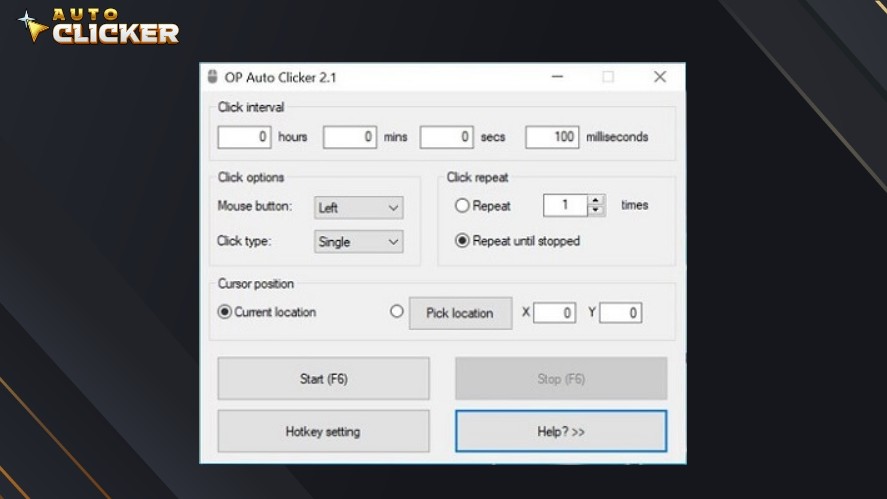
OP Auto Clicker remains one of the most popular choices going into 2026 thanks to its simple interface, unlimited click loops, and extremely low CPU use.
The tool still performs well in gaming and testing automation with customizable intervals and dual modes (single and double click), plus accurate on-screen targeting.
What You Get
- Set click intervals and delay times
- Choose mouse button and click type
- Use hotkeys to control start and stop
- Supports click location selection
Pros (2026 Update): Easy setup, repeat-until-stopped mode, reliable performance
Cons: Limited macro recording features
It’s very simple, which makes it fast and light. However, it does not support keyboard input or macros. If you just want fast and repeatable mouse clicking, this one works well.
Many users looking for an auto clicker for free find OP Auto Clicker is just what they need.
👉 Download it free at opautoclicker.com
5. GS Auto Clicker – Great for Basic Tasks
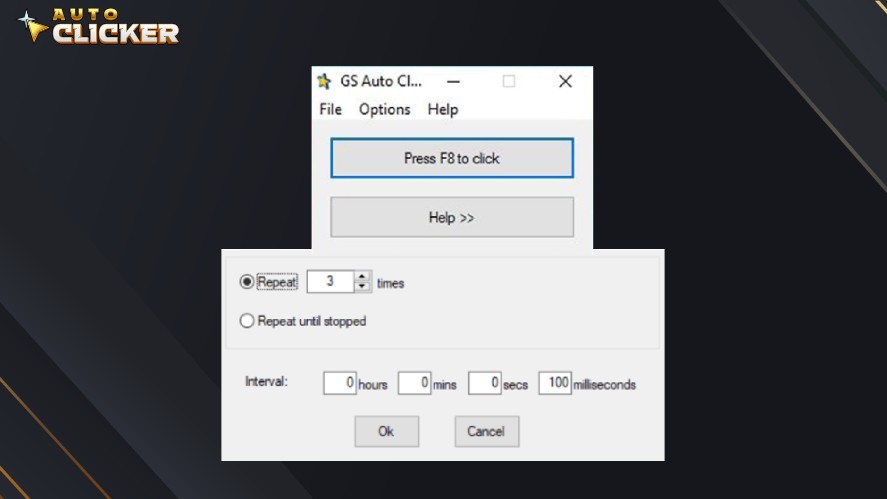
GS Auto Clicker continues to be a strong option for task automation and general productivity. It supports smart hotkey controls, auto-start loops, and basic multi-click recording, making it ideal for repetitive workflows and desktop apps.
Highlights
- Free and easy to use
- Simple hotkey setup
- Useful for small tasks or testing
Pros (2026 Update): Lightweight, excellent for office tasks, reliable trigger timing
Cons: UI feels outdated
This tool is a good fit for users who don’t care about visuals and just want something that clicks reliably. It doesn’t include features like macros or smart timing, but it works great for light automation.
👉 Download it free at goldensoft.org
6. E Auto Clicker – Simple and Functional (2026 Refresh)
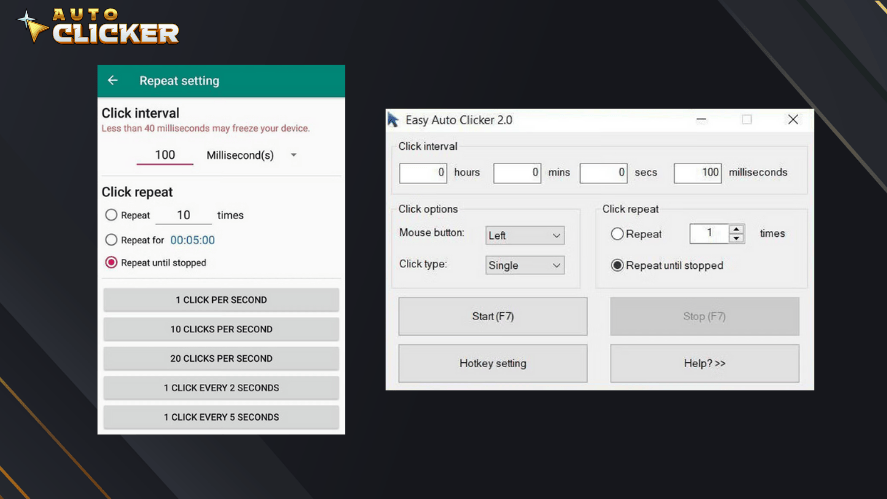
E Auto Clicker continues to serve users who want a minimal, straightforward auto clicker without too many options or menus.
What it offers in 2026:
- Adjustable click intervals
- Start/stop hotkey
- Lightweight performance that doesn’t slow your PC
- Easy to set up for short-term tasks
E Auto Clicker has fewer customization options than some of the tools above, and it doesn’t support keyboard input or complex macros. However, for users who just need quick mouse clicking on Windows and don’t want to spend time tweaking settings, it still gets the job done.
You can even experiment with running it through virtual layers or emulators if you’re trying to simulate clicks in non-Windows environments (results may vary).
Best for: quick tests and simple automation when you don’t need advanced control.
Although it is not as advanced as others, it is a no-risk option to test.
👉 Download it free at e-auto-clicker.en.softonic.com
7. Auto-Clicker – Very Basic Tool
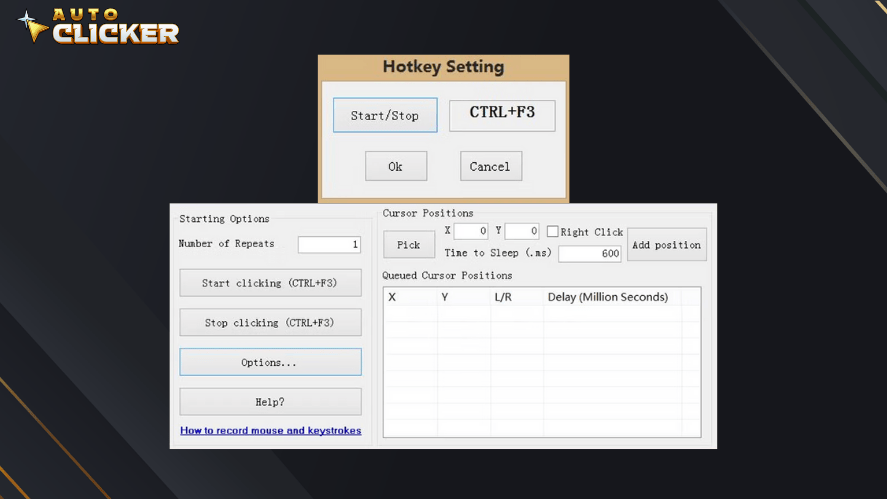
Auto-Clicker stays true to its name in 2026: it’s a very basic auto clicker with just enough features to simulate mouse clicks and nothing more.
What to expect:
- Simple UI with a focus on timing control
- Good for one-off or short tasks
- Works for basic games and desktop actions
- Very small footprint
There haven’t been major feature improvements, and the interface feels old. It also lacks quality-of-life options found in modern tools. Because of that, Auto-Clicker is better as a first experiment or backup solution rather than a long-term primary tool.
If you try Auto-Clicker and find it too limited, you’ll likely be happier with AutoClicker.com or OP Auto Clicker.
👉 Download it free at polarbytes-auto-clicker.en.softonic.com
8. Free Mouse Clicker – Mouse-Only Support
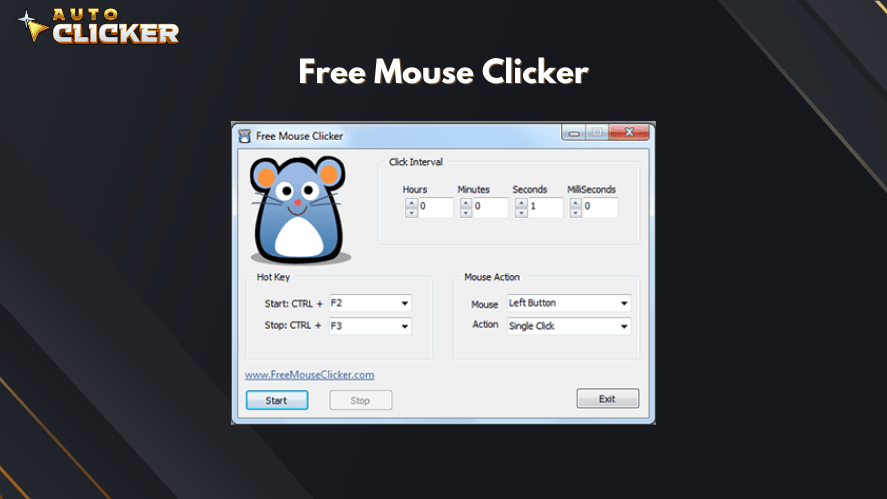
Free Mouse Clicker remains a solid option in 2026 if you only care about mouse automation and don’t need keyboard features.
Key points:
- Built purely for mouse clicks
- Supports fast and slow click intervals
- Simple start/stop hotkeys
- Quick setup and low resource usage
Because it focuses only on the mouse, it’s not ideal for advanced automation scenarios. However, that also makes it light and easy to handle, especially for click-heavy games or repetitive desktop actions where keyboard control is unnecessary.
If your workflow is “just click here a lot,” Free Mouse Clicker is still a comfortable choice in 2026.
👉 Download it free at freemouseclicker.com
9. Fast Mouse Clicker – Built for Speed
Fast Mouse Clicker is still the high-speed specialist in 2026 for users who want to push click rates to the extreme.
Things to know in 2026:
- Can simulate very high click speeds (potentially thousands per second)
- Customizable timing and click behavior
- Useful for testing limits or speed-based scenarios
- May be unstable on some systems at maximum speed
Due to its aggressive click rates, some PCs can lag or temporarily freeze if you push settings too far. It’s best used by advanced users who understand the risks and are careful with configuration.
Great for: experiments, stress tests, or niche gameplay setups where maximum click output matters more than stability.
👉 Download it free at sourceforge.net
Choosing Between Free Auto Clicker and Premium Version
If you are still unsure whether to use a free or premium tool, let’s break it down clearly.
| Feature | Free Auto Clickers (e.g. AutoClicker.com) | Advanced/Premium Auto Clicker (Steam) |
|---|---|---|
| Price | ✅ Free | 💲 Paid (One-time purchase) |
| Mouse Click Automation | ✅ Yes | ✅ Yes |
| Keyboard Input Automation | ❌ No | ✅ Yes |
| Multi-step Macros | ❌ No | ✅ Yes |
| Hotkey Customization | ✅ Yes | ✅ Yes |
| UI Design | ⚠️ Basic | ✅ Polished Interface |
| Cloud Sync (Steam) | ❌ No | ✅ Yes |
| Community & Support | ⚠️ Limited | ✅ Discord + Steam Support |
Use a Free Tool If:
- You are new to automation
- You only need to click with a mouse
- Your tasks are simple or short-term
- You want to test before spending money
Choose a Premium Tool If:
- You need to automate both mouse and keyboard
- You run scripts or sequences often
- You want cloud saving or backup
- You care about software updates and support
The best free auto clicker is often enough for casual tasks. However, once you want more control or advanced actions, paying a small fee for a premium version will save time and stress.
How to Download Auto Clicker (Free and Premium Options)
Now that you’ve seen the top tools, here’s how to get started.
Free Version – AutoClicker.com
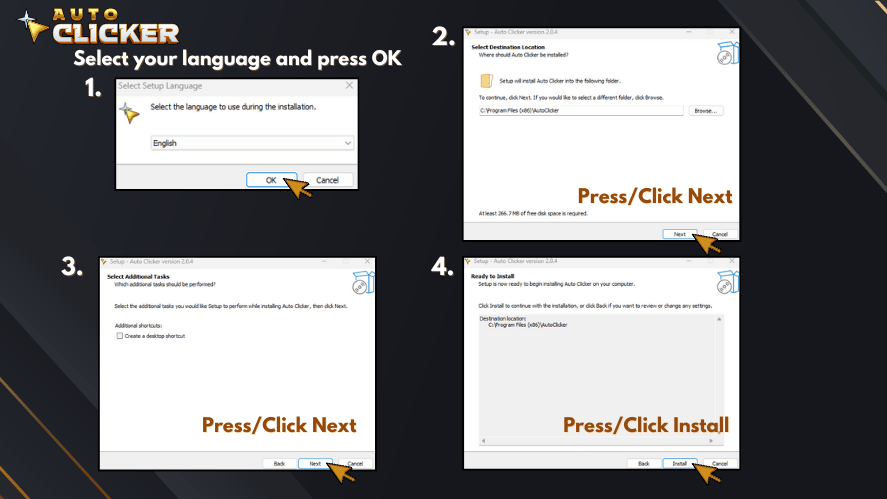
- Go to https://autoclicker.com
- Click Download Free Auto Clicker
- Open the installer and follow the steps
- Launch the program and begin using it
There is no account needed. No hidden costs. No setup issues.
Free Android Version — Auto Clicker Enhanced
- Open the official Google Play listing for Auto Clicker Enhanced.
- Confirm that the app is published by Playsaurus.
- Install it on a supported Android 10+ phone or tablet.
- Follow the setup instructions and enable the required Android permissions.
- Configure your tap or swipe automation and test it before using it for longer tasks.
Download Auto Clicker Enhanced for Android
Avoid downloading modified or unofficial APK versions from unknown websites when the official Google Play version is available.
Premium Version – Auto Clicker on Steam
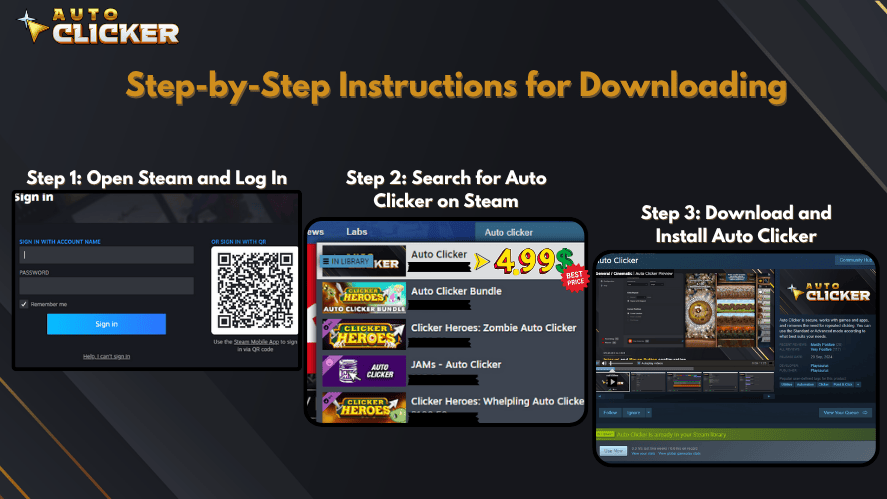
How to Download Auto clicker on Steam.
- Open the Steam client or visit the Steam website
- Search for Auto Clicker
- Click Add to Cart and complete the purchase
- Install it directly from your Steam library
The premium version includes updates, custom macros, and extra tools. You can also join the official Discord server for help and tips.
Frequently Asked Questions (2026)
Yes — as long as you download from trusted sources such as AutoClicker.com. Avoid third-party mirrors or bundled installers.
Yes — most updated tools now support modern Windows versions, including 11 and 12.
Yes — many players automate repetitive actions in PC and browser games, though always check individual game rules first.
OP Auto Clicker and GS Auto Clicker remain the easiest and fastest to set up.
Yes — most tools run locally and do not require an internet connection once installed.
Auto Clicker Enhanced by Playsaurus is an official free Android option available through Google Play. It works on Android 10 or newer, does not require root access, and supports common tap and swipe automation tasks.
Final Verdict – Start Free, Upgrade If Needed
Choosing the right auto clicker depends on how much control you need. If your goal is simple mouse clicking, then tools like AutoClicker.com, OP Auto Clicker, or GS Auto Clicker are great starting points. They are free, easy to use, and safe.
If you need to combine mouse and keyboard, or if you are automating complex steps, upgrading to Auto Clicker on Steam is worth the small cost. You get more tools, better support, and a smoother experience.
To summarize:
- Start with AutoClicker.com if you are new
- Use OP Auto Clicker or GS Auto Clicker for general use
- Try Speed Auto Clicker or Fast Mouse Clicker if you need high-speed clicks
- Upgrade to Auto Clicker on Steam when you need macros, keyboard input, or advanced features
For Android users, Auto Clicker Enhanced provides an official free mobile option alongside the desktop tools covered in this guide. This makes it easier to choose a free auto clicker based on the device you actually use rather than relying only on Windows-based software.
You don’t need to spend money right away. Test the free tools first, and only upgrade if your tasks require more power.

Auto Clicker Fix: Common Issues and Solutions

Auto Mouse Clicker: Automate Clicks & Key Presses

Script for Auto Clicking: How to Automate Clicks Like a Pro
About The Author
