
Can Auto Clicker Get You Banned in Cookie Clicker?
If you have ever asked, “can auto clicker get you banned?” while playing Cookie Clicker, you are not alone. Many players use auto clickers to reduce repetitive clicking, speed up active play, and make idle games more comfortable. However, because auto clickers automate mouse clicks, it is normal to wonder if using one could lead to a ban.
The good news is simple: Cookie Clicker is a single-player idle game, so using an auto clicker does not usually create the same ban risk you might see in competitive online games. Still, it is important to understand when auto clickers are safe, when they can be risky, and how to use them responsibly.
In this guide, we will explain whether an auto clicker can get you banned in Cookie Clicker, how auto clickers work, what risks exist in other games, and why Auto Clicker on Steam can be a safer option for players who want better control.
What Is an Auto Clicker and How Does It Work?

An auto clicker is a program or tool that simulates mouse clicks at customizable intervals. It handles clicks for you, letting players repeat actions over and over without needing to click the mouse themselves. In clicking games like Cookie Clicker, where progress is often based on how quickly or how often you click, this kind of tool becomes incredibly appealing.
Whether you’re trying to reach a trillion cookies or just automate mundane tasks, auto clickers offer an easy shortcut. One of the most accessible and user-friendly options is the Auto Clicker on Steam, which allows for precise adjustments in click rate, timing, and hotkeys.
Auto Clicker Use in Idle and Incremental Games
Developers design idle games often called incremental games to encourage exponential growth through simple actions like clicking or tapping. These games reward players who interact consistently, which makes auto clickers an ideal tool.
Players in titles like Cookie Clicker, Adventure Capitalist, Clicker Heroes or Realm Grinder often employ tools like auto clickers to:
- Avoid repetitive strain injury from constant clicking
- Automate long idle grinds
- Maximize efficiency during active play sessions
In Cookie Clicker, an auto clicker for Cookie Clicker can help automate cookie production, click golden cookies, and more ultimately enhancing the overall experience without breaking the game’s balance.
Why Players Use Auto Clickers in Cookie Clicker
Cookie Clicker is built around simple actions that grow over time. At first, you click cookies manually. Then, as you earn more cookies, you buy upgrades, buildings, and boosts that increase your production.
However, manual clicking can become tiring. As a result, many players use an auto clicker to make the game easier to manage.
Players often use auto clickers to:
- Boost early-game cookie production
- Click faster during active play
- Test different click speeds
- Reduce wrist and finger fatigue
- Make long sessions less repetitive
In other words, an auto clicker does not replace the entire game. Instead, it helps automate the repetitive clicking part so players can focus more on upgrades, strategy, and progress.
Can You Get Banned for Using an Auto Clicker in Cookie Clicker?

Here’s the question players keep asking: can auto clicker get you banned in Cookie Clicker? has a simple answer: No, the game doesn’t ban players for using an auto clicker.
Why Not?
- Cookie Clicker is a single-player game. There is no competitive online component, leaderboard enforcement, or in-game moderation that checks for third-party tools.
- There are no server-based anti-cheat systems. You run Cookie Clicker locally on your browser or through a downloadable version, so no server monitors or flags your behavior.
The developer designed the game to let you play however you like whether manually or with automation. In fact, some community mods and strategies even encourage creative automation.
Understanding the Game’s Nature
To fully grasp why it’s safe, you need to understand what Cookie Clicker really is:
- Offline-friendly: Cookie Clicker keeps running in the background and keeps building progress even when you’re away.
- No multiplayer aspect: Cookie Clicker doesn’t include PvP or a competitive ladder, so using a mouse clicker won’t affect other players or game balance.
- Open to mods: The developer, Orteil, has supported creative modifications, making automation more of a feature than a flaw.
This sandbox nature means using an automatic clicker in Cookie Clicker doesn’t violate any game terms or ethics.
When Is It Considered Cheating?
Even though the game doesn’t ban players for it, some people still consider using an auto clicker a form of cheating:
- Purists who enjoy the clicker challenge might frown upon automation.
- Community competitions or modded events might have rules that restrict auto clicker use.
So, while you’re not breaking any game rules, you might want to check community guidelines if you’re participating in shared challenges.
Is Using an Auto Clicker Considered Cheating?
This depends on how you define cheating.
Some players believe auto clickers are fine because Cookie Clicker is an idle game. After all, the game already focuses on automation, upgrades, and passive progress. From this point of view, an auto clicker simply makes active clicking less tiring.
However, some players prefer a fully manual experience. For them, using an auto clicker may feel like skipping part of the challenge.
So, is it cheating? Technically, Cookie Clicker does not usually punish players for it. Still, some communities may separate manual runs from automated runs. Therefore, it is best to be honest if you are sharing your progress in a challenge or event.
Risks of Using Auto Clickers in Other Games
While Cookie Clicker is auto clicker–friendly, this doesn’t hold true for all games. In fact, in many competitive or multiplayer games, the use of auto clickers can lead to penalties, including bans.
When Auto Clickers Can Get You Banned
Although Cookie Clicker is generally safe, auto clickers can get you banned in other games. This is especially true for online games where automation gives players an unfair advantage.
Here are some examples:
| Game Type | Ban Risk | Example Games | Why It Can Be a Problem |
|---|---|---|---|
| Competitive FPS games | High | Valorant, CS2 | Auto clicking can look like rapid-fire automation |
| MMORPGs | High | World of Warcraft, Lost Ark | Auto farming can break game rules |
| Online simulators | Medium to High | Roblox simulator games | Auto gains may affect leaderboards |
| Mobile PvP games | Medium | Strategy and battle games | Automation can create unfair progress |
| Single-player idle games | Low | Cookie Clicker, Clicker Heroes | Automation usually affects only your own game |
Because of this, you should not assume that an auto clicker is safe everywhere. Before using one in any online game, check the game’s terms of service and community rules.
These games have anti-cheat systems like:
Games with anti-cheat software (e.g., BattleEye, Easy Anti-Cheat) can detect click patterns, memory injection, or repeated behavior associated with automated mouse clicks, resulting in account bans.
Key takeaway: Always read the terms of service and community guidelines before using an auto clicker in games other than Cookie Clicker.
Why Auto Clicker on Steam Is a Safe and Flexible Tool
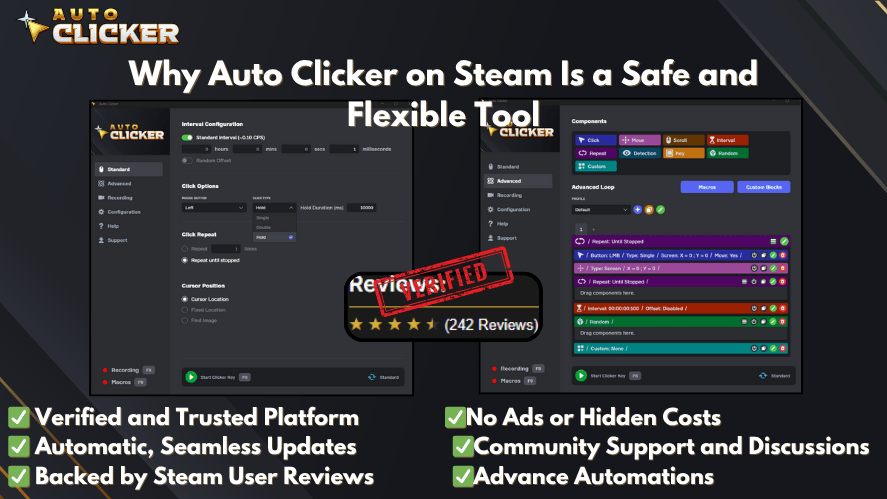
If you’re considering automating tasks in Cookie Clicker, the Auto Clicker on Steam is one of the best solutions available. Here’s why:
Customization Features
- Click interval control: Set clicks per second based on your system and preference.
- Hotkey activation: Easily toggle the auto clicker on and off.
- Click limits: Prevent the clicker from running indefinitely.
Safe for Single-Player Use
Unlike software that injects code or alters game memory often triggering detection systems the Steam Auto Clicker stays completely external, making it a much safer option.
- Operates on a simulated mouse level
- Doesn’t interfere with game files
- Is safe to use auto clicker–wise for most single-player applications
Whether you’re looking for the best auto clicker software or just a safe way to automate mouse clicker tasks, this tool offers the ideal balance of control and safety.
Safe Auto Clicker Settings for Cookie Clicker
Although you can set an auto clicker to click very fast, faster is not always better. Extremely high speeds may cause lag, missed clicks, or poor performance.
For a smoother experience, start with moderate settings first.
Recommended beginner settings:
| Setting | Suggested Option | Why It Helps |
| Click interval | 50 to 100 milliseconds | Fast enough without causing too much lag |
| Click type | Left click | Works for the main cookie |
| Click location | Fixed position | Keeps clicks focused on the big cookie |
| Hotkey | Easy toggle key | Lets you stop quickly |
| Click limit | Optional | Helps prevent endless clicking |
After that, you can adjust the speed based on your computer performance and comfort level.
Understanding Cookie Clicker Mechanics

To use auto clickers effectively in Cookie Clicker, it helps to understand certain in-game mechanics:
What Does Mouse Acceleration Do in Cookie Clicker?
In Cookie Clicker, mouse acceleration increases cookie production the faster you click within a short time frame. The more rapid your clicks, the higher the temporary multiplier bonus.
Auto clickers take advantage of this mechanic by delivering consistent high-speed clicks, making them ideal for maximizing this bonus during active play.
All Mouse Upgrades Cookie Clicker
If you’re using an auto clicker, you’ll benefit even more once you unlock the all mouse upgrades Cookie Clicker offers:
- Reinforced index finger
- Carpal tunnel prevention cream
- Ambidextrous
- Thousand fingers (and its subsequent upgrades)
These upgrades boost your cookies-per-click and work perfectly in tandem with cookie clicker auto clicker tools.
Can Auto Clickers Click Golden Cookies?
Some advanced auto clickers can be configured to click specific areas. However, golden cookies appear in different places, so basic auto clickers may not catch them automatically.
If your auto clicker only clicks one fixed location, it will work best on the big cookie. However, if you want to click golden cookies, you may need a more advanced setup or manual attention.
Still, for most players, using an auto clicker on the big cookie is already enough to improve active play.
How to Download an Auto Clicker (Safely)
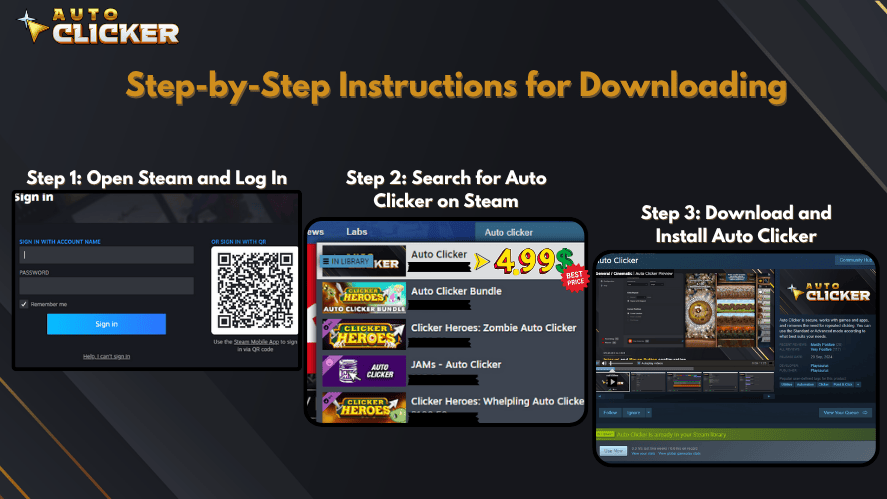
Looking for a how to download an auto clicker tutorial?
Here’s how to do it the right way:
- Choose a reliable source: Steam, GitHub, or trusted developer websites.
- Avoid sketchy ads: Many “free auto clicker” sites bundle malware.
- Check customization options: Ideal tools should let you automate mouse clicks, set intervals, and create profiles.
- Run a virus scan: Before installing any auto clicker download, check with antivirus software.
Some recommended options include:
- Steam’s Auto Clicker is a top choice for Cookie Clicker players.
- OP Auto Clicker
- GS Auto Clicker
- E Auto Clicker
- Auto-Clicker
- Free Mouse Clicker
- Fast Mouse Clicker
Are These Auto Clickers Safe to Use?
If you want to use an auto clicker for Cookie Clicker, it is important to choose one that is safe. The table below shows some of the most trusted auto clickers. These apps are often used for games like Cookie Clicker. They do not change your game files or memory, which makes them safe for personal use.
Trusted Auto Clicker Options for Cookie Clicker
Here are some common auto clicker tools players often consider:
| Auto Clicker Tool | Platform | Best For | Safety Note |
| Auto Clicker on Steam | Windows, Steam | Easy setup and trusted download | Best choice for Steam users |
| OP Auto Clicker | Windows | Simple clicking controls | Use official sources only |
| GS Auto Clicker | Windows | Basic auto clicking | Avoid third-party mirrors |
| E Auto Clicker | Windows | Fast clicking | Download only from a trusted site |
| Auto-Clicker | Windows, Linux | Cross-platform use | Check the source carefully |
| Free Mouse Clicker | Windows | Simple automation | Watch for fake download pages |
| Fast Mouse Clicker | Windows | High-speed clicking | Use carefully to avoid lag |
The safest option is always the one downloaded from a trusted source.
Why These Auto Clickers Are Safe
The apps listed above are safe because they do not change or break your games. They work by copying real mouse clicks. This means they act like you are clicking, but you don’t have to do the work. Here are more reasons why they are safe:
- They don’t access or modify your game files or system memory
- You can control the click speed, timing, and location
- These tools work offline and don’t collect personal data
- Many people in the gaming community trust and use them
- Steam Auto Clicker is downloaded from Steam, which checks files for safety
Tip: Always download from the official website or trusted places like Steam or GitHub. Avoid third-party sites that may include viruses or extra programs. You can also run a virus scan before installing.
Best Practices Before Using an Auto Clicker
Before you use an auto clicker, follow these simple rules:
- Use it mainly for single-player or offline games
- Avoid using it in competitive online games
- Keep your click speed reasonable
- Use hotkeys so you can stop quickly
- Download only from trusted sources
- Check community rules before joining challenges
- Do not use tools that modify game files
By following these steps, you can enjoy automation while avoiding unnecessary risk.
Frequently Asked Questions (FAQs)
No the idea that you can get banned from Cookie Clicker is just a myth. Since it’s an offline game meant for solo play, there are no bans for using tools like auto clickers.
Yes. If you’re using it for offline or non-competitive games, auto clicker safety isn’t a concern especially when using a tool like the one on Steam.
Auto Clicker on Steam
OP Auto Clicker
GS Auto Clicker
E Auto Clicker
Auto-Clicker
Free Mouse Clicker
Fast Mouse Clicker
It depends on your personal playstyle. Some players see it as normal automation, while others prefer manual clicking. However, Cookie Clicker usually does not punish players for using an auto clicker.
Yes, auto clickers can get you banned in some online or competitive games. If a game has anti-cheat software, multiplayer rankings, or strict automation rules, using an auto clicker can be risky.
Auto Clicker on Steam is a strong option because it comes from a trusted platform and gives users control over click speed, timing, and hotkeys.
Each allows for automate mouse clicks capabilities with full user control.
Conclusion
So, can auto clicker get you banned in Cookie Clicker? In most cases, no. Cookie Clicker is a single-player idle game, so using an auto clicker does not usually create a ban risk.
However, that does not mean auto clickers are safe in every game. While they are useful for Cookie Clicker and other idle games, they can be risky in competitive online games with anti-cheat systems.
Therefore, the safest approach is simple: use auto clickers only in games where automation is allowed or harmless, download tools from trusted sources, and avoid using them in multiplayer games where they could create an unfair advantage.
Just remember: Always verify the game you’re playing. Auto clickers are amazing for clicker games, but can get you banned in competitive titles.
Want to learn more? Check out our guide on how to use auto clickers safely or Cookie Clicker auto clicker settings.

Automatic Clicking Made Easy with Auto Clicker on Steam

Clicker Simulator Online: Boost Progress with Auto Clicker

Clicking Games Made Easy: Why You Need an Auto Clicker
About The Author
